I’ve heard variations of this phrase too many times lately. Most recently on the HBR blog, where Mark Medice states, “I would suggest that if the economy were to swing to a strong recovery in six months …, then major changes to pricing structures would be muted.” Every law firm has a cadre of partners waiting patiently for this scenario to play out. Now one might argue about the speed of the recovery, but I think the base assumptions of this thinking are misguided.
I see three legs to the current Change Stool. One is the Recession. The other two are: 1) The impact of technology and 2) The loss of seller power in the market. The Recession – IMHO – has merely been serving as an accelerator for the other two influences. And I believe the other two are the real driving force for change.
As my AFA colleague and I like to say, “The lawyers’ guild was broken in the GC’s office.” The last time the CEO went into the GC’s office and made their annual request for cost savings, they didn’t respond well to the traditional GC claim about the inability to anticipate and therefore control costs. The CEO replied, “I know someone who can help you and they’re called Purchasing.” This outcome is evident in the current number of RFPs and deals driven in whole or part by the purchasing department.
First hand I have heard from GCs that their focus on “changing pricing structures” is at least a 3 to 5 year project. One even said “the legal department is the last bastion of untapped cost savings for the company.” Companies expect their suppliers to constantly be innovating, lowering costs and increasing value. Now legal services is falling under these same pressures. The bottom-line: An economic recovery will not be changing the underlying cost control goals of clients.
Although an economic recovery may bring an increase in the amount of work in the market, thinking that expansion means a return to open season for rate increases and billable hours is dangerous. If you disagree, I encourage you to ask your clients. Since they are the ultimate arbiter of this issue.

I ran across two posts today that demonstrate the transition that the physical space a library occupies is going through right now. Betsy McKenzie at Out of the Jungle Blog had a follow-up post on the Cushing Academy’s (private school in Massachusetts) ditched all of the books in its library and created a “digital library” with the focus on making the library more about “service” than about books. Apparently, the success of this transition is so popular that the headmaster has gone “from pariah to prophet.”

The other post was in the Columbia Spectator (Columbia University newspaper) about a (what I assume is an undergrad) student who found her way into the law library and was sorely disappointed in what she found:

  • Books
  • Quiet 
  • Lots of room to spread out and study
  • No food or coffee
  • No decent WiFi 
  • No cell phone reception

From this student’s point of view, the law library at Columbia Law School was so restricted that “the library feels vaguely like a maze of finding what you can and cannot do. Figuring out what you’re allowed to do will be harder than any work you bring.”

The student wasn’t completely negative in what she found in the law library. For example, the service she received from the law librarians and staff was “exceptionally helpful and friendly.” Hmmm… there’s that word again… “service.”

We’ve argued in the past that the library is not a place which only houses books, but rather is a place that serves its community and provides it with a place for that community to come (physically or virtually) to access the information that community requires. To equate a library as a place to find books is as short-sighted as equating it as a place to get coffee. Libraries serve their community. In serving the community, the library may offer coffee… bagels… rest rooms… WiFi… and even a book or two. All of these things are important, but they are secondary to the overall service that is provided to the community.

I received a call on Monday afternoon telling me that a friend of the family had been killed while crossing a busy intersection near my house. I tried to find out what happened through the local media, but all I could find from the reporters was a statement that a woman was struck and killed by a garbage truck and no other information was available pending notification of the family.

After checking back an hour later, I did something that I really didn’t want to do… I checked the “comments” section below the online story. What I found showed the power of web 2.0, and both the good and the bad that comes with that power.

From the comments I learned that she was on a bicycle, in the bicycle lane at a red light. She went straight, while the garbage truck made a wide right-hand turn and didn’t see her in the bike lane. Although the results of the accident were tragic, through the comments, the reported story, and from my own personal knowledge, I now had enough information to piece together what had happened. That was the “good” part of Web 2.0 – people on the scene giving accounts of an awful event.

Then came the “bad” part of Web 2.0.

One of the reasons that I hesitate to read comments on news stories like these is that people with no relationship to the story, hiding behind anonymous screen names, decide that what this story needs is their opinion to be heard. To make it worse, their is almost a competition between commenters of who can get the most “thumbs-up” or “thumbs-down” on their comments from other readers – the more “opinionated” the comment, the more “thumbs-up” or “thumbs-down” they receive.

A “savvy bicyclist” decided that this was a “teachable moment” and explained that what she should have done was put her bike half-way into the car lane instead of staying in the bike lane. This caused a reaction from another commenter to state how they’ve seen a bunch of “local apartment dwellers” on bikes carelessly cross that intersection and they are not surprised that this happened at all.  Quickly followed up by another commenter that said that idiotic pedestrians are crossing against the red light all the time, and this is probably what happened (although they had no idea if that was true.)

So there I was… facing the “good” and the “bad” of news + Web 2.0. I got a better understanding of what happened – and that was good. I also saw the contempt of the community toward something that they had no understanding of, but still held out their opinions as though they did – and that was bad.

None of the commenters knew that if the young mother of two had made it across that intersection that she would have reported for her first day at a new job. None of those commenting knew that it was her son’s birthday. None of those commenting had to come home tonight and tell their children that their friend’s mom died today. None of those commenting had to watch their own children Facebook chat with a grieving friend who said that she’d be out of school for a while until after her mom’s funeral.

In a Web 2.0 world, everyone has the ability to share their comments with the world. Most of the time I would give it a thumbs-up… but I have to admit that I don’t feel as good about it right now.

I think I have finally figured out why lawyers don’t like social media. Typing.Yes, typing. Many of the lawyers of a certain generation are used to handing over dictaphone tapes, orating from behind podiums or simply taking handwritten notes on a legal pad. They can’t be bothered to type.Now, with the “burgeoning” of technology into all kinds of platforms that require hen-pecking, these lawyers are at a loss and “can’t be bothered.” These are the same attorneys who don’t know the difference between Outlook and Internet Explorer.I’m so glad my dad made me take typing classes.During that pro-feminist era, I scoffed at what I thought was his preparing me for a future as a secretary. Little did I realize that my dad was one of the first computer administrators of his generation—he got his Masters in Mathematics back in 1960. I have a hard time of conceiving of a Masters degree in Mathematics; pretty heady stuff. He saw where the world was going and he knew how important typing was going to become.He was ahead of his time.So programs like Skype or 8pen may offer the solution these attorneys need. But I don’t think so. I have found both of these programs to be a bit challenging.The best solution?Vlingo, a dictaphone app built for BlackBerry phones. It works across a number of platforms including text messages, Twitter, Facebook, BBM, Yahoo and Windows Live. Plus, it will read your incoming messages to you.So, see, you less tech-savvy lawyers can participate in social media too.Now we just need to teach them how to download an app …

I recently bumped into some old colleagues of mine and we were talking about the changing face of knowledge management and library departments in law firms. We talked about how there really is no one-size-fits-all for these departments; each should evaluate itself in its current space, and assess the best place for it to be in order to bring the most value to its organization. This discussion got me thinking about all the changes that have occurred in just the past five years in the world of law firm business units and business structures — marketing, library, finance, and IT departments have now morphed into countless variations, with each firm creating, modifying, re-shaping, splitting, and merging departments in increasingly creative ways. Knowledge management, client relations, competitive intelligence, business development, and alternative fee management are just some of the newly named departments, and each firm structures these in its own way: some of these become their own departments, some become merged and re-named departments, some become sub-departments of another department, and some are not formalized departments at all but represented by one or two professionals who report to a related department. The variations are truly endless, but more importantly they are constantly changing. What works for you today may not work for you a year from now. And there’s the rub: to be successful and to help make your department successful, you must expect change and evolution. Think of it as versions 2.0, 3.0, and 4.0 of your department. As you have more information about what works and what doesn’t, what your internal and external clients need and what they really don’t, you can refine original ‘features’ (services), add new and better ones, and generally become a stronger, more effective department. You may not know today what new features you’ll be adding in a year or two, but expecting those unexpected changes will ensure you continue to provide the best service you can to those around you.

Treading in to what is normally the Cheap Geek’s space, based on a series of conversation with Scott, Kingsley Martin and our library team, we developed an idea we think may bring high value to law firms and breathe new life into the role of the legal librarian.
We are faced with the challenge of deploying a next generation, analysis-level knowledge management (KM) project. I have previously posted on the evolution of legal KM, moving from Search to Collaboration and into Analysis. It’s this Analysis KM stage that I find very interesting. The challenge comes about in how to implement Analysis KM. This is no longer simply a system you implement and market to the firm. Following on Greg’s excellent post last week, this is not your pretty interface KM. Instead, Analysis KM requires a new kind of human participation.
Adding another layer to this thought process – the major difference between US and UK legal KM has always been focused on the role of humans. In the UK, KM is human centric via the use of Practice Support Lawyers (PSLs). In the US it’s been technology centric. My sense is that both sides have tried to co-opt the other’s approach into their own, but only with limited success. A nice middle ground would seem to be KM that leverages humans and technology in a new, higher-value way.
Enter the Legal Librarian.
In exploring the use of KIIAC (Kingsley’s wonderful, magical new KM tool), we struggled to find the right kind of owner within the firm. By chance, Scott and I presented to our Library Team this week on developments in the market. One question we received was “How can we help?” Which lead us to the epiphany in question: Why not use librarians in a quasi-PSL role to become the experts on Analysis KM applied to specific practices?
Our initial exploration of this idea is very promising. Librarians are very well suited to this role, both in terms of knowledge and skill-sets. Additionally, they are not as bound to the billable yoke and are therefore able to consistently participate in a project like this.
And the librarians? So far they love the idea. This puts them on the cutting edge of the practice of law. We’ll see how this evolves, but so far, so good.

More than once I have been asked, “Where should law firms be in the social media landscape? Facebook or LinkedIn?” And, by coincidence, a colleague circulated a blog posting from Entrepreneur.com, “Thoughts on Twitter Versus Facebook for Business.” Which made me thing, “heck, I should write a post!” (Plus I ran into fellow Geeksters @gnawledge and @glambert; they hassled me about not posting anything lately.) So here are my thoughts: Facebook Every business that I have seen on Facebook is either for consumer goods that have masses of people from the general public going through their doors (i.e. restaurants, car dealerships and services, banks, food, gas stations, clothing stores) or seriously need to manage their brand (oil companies, government). The few professional services that I have seen on Facebook use it for either alumni or recruiting purposes–a capability that is easily duplicated on LinkedIn. Facebook has some interesting functionality: their new groups feature is nice. I was able to quickly create a private group where my friends and I can swap updates, photos and links. Very user-friendly. LinkedIn I see all kinds of businesses on LinkedIn: mom & pop companies, art galleries, professional services, manufacturers. With the new functionality that LinkedIn is beta-testing with companies, I think we can look forward to some very robust features in the near future. I have had the privilege of talking to a few of their reps a couple of times and I continue to keep an eye on their new offerings. Plus, you just can’t beat LinkedIn for offering a professional environment for posting your profile. No incongruous, dicey-looking ads run adjacent to my face offering to give me a “web analytics certificate”. At least LinkedIn’s ads are playing with the big boys, like Microsoft. Plus, they keep growing their profile features. I really like the new “Skills”, “Patents” and “Publications” sections. It’s a great place to showcase deeper skill sets. And LinkedIn’s Groups have been around for some time, while Facebook has just recently added this capability. LinkedIn’s group functionality is pretty robust. Facebook’s isn’t bad either. It’s just that LinkedIn’s is going to give you better access to the types of professionals that law firms are going to want to make contact with. Plus it has a daily or weekly digest e-mail–a feature that Facebook doesn’t have. Twitter Now Twitter is my drug of choice. I do the other two because, well, its my job. But Twitter? Twitter is amazing. I can find out the most obscure things I never would have found otherwise. I learn things faster. I see more. I meet more. And its just weird because, technically, it’s the least flexible. And, the other thing about Twitter is that nobody uses Twitter. We are all using one of the third-party apps like TweetDeck, Hootesuite and UberTwitter to access our accounts. I particularly like TweetDeck because I can set up customized columns to follow certain interests like News, Law or Ashton Kutcher (sorry, he has to be mentioned in some form on my posts). I was (and continue to be) really pleased that I was one of the first to bring our business into this particular sandbox. And we are still going strong. And I continue to be amazed as to who is interested in what we have to say. Twitter is viral marketing at warped speed. If your 140-character message is potent enough, it can go around the world in minutes–it can even cause a whale to fail. Law firms should look at Twitter as a branding tool. After measuring, posting and reading Twitter for over 3 years, what I have come to realize is that Twitter gets me out there into the collective conscience and in front of people that I normally would have never met. I have been recognized solely by my Twitter profile. Bottom Line Why not? Why not go ahead and post on all three? Sure, you got to be smart about it. Follow the rules, have a disclaimer, don’t misrepresent yourself or your firm. Just try it. Lawyers tell me all the time that they just don’t get it. And I have a hard time explaining it. Believe me, I was just as skeptical–I am a lawyer, after all. But after just a few weeks in every single one of these environments, I have been amazed at what I have received and learned. People are generous. People are kind. People want to connect. Sure, there are smarmy folks out there. Believe me, I see them every day. But I see smarmy folks all the time, every where, not just online. We have all learned to filter in real life. Now we just have to learn how to filter online. Come on; get out on the dance floor and dance. Don’t be one of those guys who stands against the wall, trying to look like they are too smart/cool/rich to dance. Because if you don’t dance, you will never get to meet that special someone. And they just might be that golden goose you’ve been looking for all this time …

I’m sitting in tomorrow on Rich Leiter’s Webinar/Podcast, where we’ll talk with Lawyer, Writer, Law Professor, and all a round deep-thinker, Richard Dooling.

Doolings’s latest book, Rapture of the Geeks: When AI Outsmarts IQ, discusses (and makes fun of) a number of scientists, technologists, and lawyers and he seems to be either a very smart person… or a complete lunatic. I’m hoping for a bit of both.

I had to laugh, though, when I was reading a 2008 review of his book in ARS Technica  and the “two-page” review ended page one with this quote:

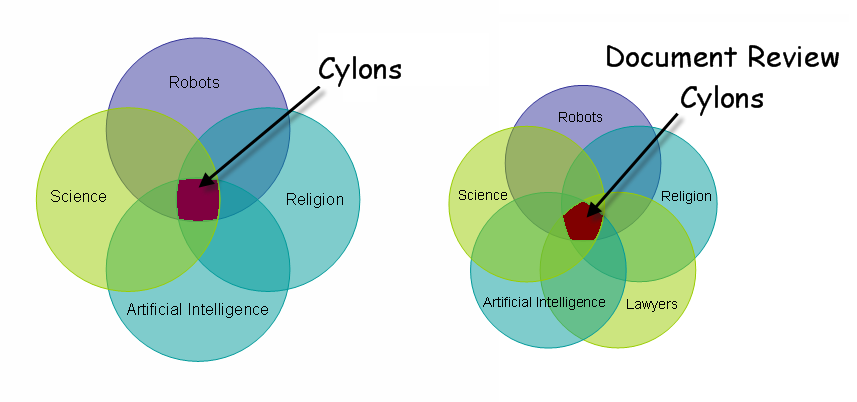
“Which brings us to the Cylons”

What a hook!! I had to go to page two to see how the Cylons came into play, and I decided right then and there that I needed to borrow that for a blog post title!

Within a few minutes, I read this review, had a long talk with my E-Discovery support person, and got the email from a friend about an xkcd.com cartoon and diagrams from This is Indexed (both of which are worthy of a spot in your RSS feed!!)

My brain immediately came up with this Venn diagram:

Mark Gediman says that The Borg would be a closer relation, but I told him that I’d have to take out the “Religion” circle to make it truthful.
So, tune in at 2:00 PM Central (Nov. 5th) for LawLibCon 15 with Richard Dooling.

In an era where the business model seems to be “do more with less”, improving productivity is important in achieving this goal. We’re all looking for tips and suggestions that others are using to increase productivity, so we thought we’d compile a few from different perspectives on this question:
What is something you can do immediately to be more productive?
One of the common themes this week seems to be the “to thine own self be true.” Many of us suffer from overexposure to information (distractions) or opportunities to divert our attention from the task at hand.
Thanks to all of our guest contributors this week. Next week’s Elephant Post question is at the bottom of this post. We’re always looking for different perspectives, so read through this week’s contributions, then take a look to see if you’re up to the task of adding in your 2¢ on next week’s Elephant Post.
______________________________________
Library Perspective:
Need to be more productive? Just ask the people actually doing the work!
One of the things that I tell my staff is that they have the best perspective on what does and what doesn’t work in our department. If I tell them to do something, and it causes more problems than solutions, then they need to speak up and suggest alternative ways to accomplish the objectives.
Many times they suggest processes and procedures that I would have never thought of because they are exposed to things that I’m not. It just makes sense to do this, but sometimes it is easier to just give unproductive instructions than it is to ask for feedback and adjust. On the other end of the spectrum, sometimes it is just easier for those doing the work to simply follow inefficient instructions than it is to stop and suggest better ways to do it.
Now, this doesn’t mean that every suggestion is feasible – remember, you’re the leader, so the results are still your responsibility – but most of the time the suggestions are spot-on. If you need to increase productivity immediately, then take a few minutes to get feedback from the troops on the ground.
___________________________________________
IT Perspective:
Need to be more productive?  Stop looking at your email!
Note: These same tips apply to social media.
Email, or the anticipation of email, is probably the biggest time killer in modern day.  By limiting how often you check your email, you will save loads of time and you will have better focus.  Try  limiting how often you check your email to two or three times a day, unless you are expecting an important email.  If you have an important email, deal with it and move on.  Otherwise,set aside thirty minutes in the morning and thirty minutes in the afternoon to deal with emails that you did not respond to earlier in the day.  
By scheduling this process you will, over time, retrain your mind to stay focused on the task at hand.  Obviously, this technique will not work well for a service desk where there is an expectation that the email is being constantly monitored, but for most of us, it will give you back time in the day and improve your focus.  Here’s another email tip, if it will take more than five minutes to read and respond to an email, consider picking up the phone instead.  A phone call might take longer than responding by email, but it will lead to better communication and better communication will save you time.
Give it a try and let me know how it goes.  If it works well for you, I might even try it.
___________________________________________
AFA Perspective:
Need to be more productive? Old fashioned Prioritize and Delegate
A significant challenge with AFAs, is the pull to do work beyond the AFA to try to make it successful.  An excellent example of recent interest is Legal Project Management (LPM) and the related efforts around it.  A high value I feel I bring to any position is the willingness to do whatever it takes to get things done.  In my current role, that was initially a very valuable asset, but has since become a liability.  Now there are so many interesting and fascinating rat holes to run down I don’t know where to begin.
So the correct answer is to not run down them.  If they are indeed valuable, I need to find the right resource and pass the project on.  This approach will be fighting numerous instincts to hang on to valuable projects.
But as Scott has said over and over, it’s the sharing thing that has value.  And so I will …
Bottom line: stop trying to do everything, become more productive by focusing on the highest value efforts.
___________________________________________
Online Marketing Perspective:
Need to be more productive? Work from home
On the occasions when I have had to stay home to wait on an electrician, floor installation or appliances, I have always been able to perform twice as many tasks–sometimes even three-times as many tasks–than I do at work.
Not only are there lots of distractions at work–impromptu visits, telephone calls, water cooler sessions–the commute sucks up time.
The best part of my job is that it is all about the web. Ergo, all of my work is on the web.
Meetings, phone calls? Today, technology addresses all of these. I’ve taken meetings at the airport, while waiting for a cab and from a remote cabin in New Mexico.
Technology.
It’s an amazing thing.
___________________________________________
Library Perspective:
Need to be more productive?  Tap into your passion.
When I started thinking about this question, my initial response was to stop spending time on Facebook, Twitter, etc.  But, the more I thought about it, my answer really is to schedule time for all different types of activities, including things like social media.  It is easy to get caught up in whatever is happening on a given day.  It is important to block off, find or make time in the day for things that would otherwise fall off the radar or get moved to the back burner, like writing, innovative thinking, professional reading and establishing and strengthening relationships.  
I have found that when I do these kinds of non-urgent things, the benefit I get from doing them far outweighs the time that I spent on them.  A 10 minute meeting with an innovative thinker in my firm might spur ideas in me for my department and get me motivated to develop and work on them.  Keeping up on a conference I couldn’t attend through a Twitter feed may give me an idea for an article or a presentation, or even just provide me with some key quotes or “nuggets” to save and use at a later date.  
I think as we are asked to do more with less and increase our productivity, we need to find and tap into our passion.  This is what will really allow all of us to be more productive and successful leaders within our organizations.
___________________________________________
Knowledge Worker Perspective:
Need to be more productive?  Use the right hardware and software.
You can never be too rich or too thin – or have too much screen real estate.  When I travel, my biggest productivity drain (other than airports), is having to work exclusively from the screen of my notebook PC.  In my office, I have an external, virtualized 19” monitor.  Dual monitors make a huge difference in productivity; I’ve seen studies that say up to 15%.   I set up all my open applications so that I have instant and random access to each with a click of a mouse.  Plus I can drag information across open windows on the two screens.  But wait, there’s more… some work just requires a big screen.  For example, I am working on a big spreadsheet this week where I maximize Excel on my 19” monitor, which let’s me work much faster.   
Even if you are rich, thin, and have a lot of screen real estate, you probably struggle to keep track of all the miscellaneous information in your professional and personal life.  I use Microsoft OneNote for this, including keeping notes on phone calls, planning conference presentations, taking notes on materials I read or review, and managing my to do list.  The tabbed interface – both vertical and horizontal – makes organizing information easy.  If that’s all those tabs are not enough to find what you need, the built-in full text search is great.  Oh, and did I say it’s also the best outlining program I’ve found.  My friends and reviews tell me that Evernote is a good competitor that has similar functionality.
___________________________________________
Lawyer Perspective:
Keeping Focused on the Web
Most of my work is on the web, and I find it’s easy to get lost down the Rabbit Hole if I don’t have a system in place. I use browser windows to manage my workflow: I keep one open for email, Facebook, Reader, and other sites that I use constantly throughout the day. That’s home base. I open separate windows for each project I’m working on, and tab the pages I need within the window. For example, I’ll have a window each for a blog post draft, different product task lists and associated documents, legal memos with open tabs for research, etc. I minimize everything except the project I’m working on and home base. This does two things for me: allows me to quickly find the appropriate documents by project, and keeps me focused. I find that it’s too hard to tune the noise of the Internet out otherwise.
I also keep a “Things to Read” window open at all times–if I stumble on something that looks interesting or useful, but not needed for the task at hand, I tab it in this window. When I’m eating lunch, need a mental break, or have a few moments of quiet, I hit that tab. I find it’s helpful to always have something at the ready if I have some down time–it prevents me from going into a gossip blog or Facebook timesuck.
______________________________________
Competitive Intelligence Perspective
Your Alert is In
The deluge of information out there can make anyone’s head spin. Especially if your job is to read it, digest it and pass on the salient bits to someone else to use in their decision making process.  My trick, is to set up and use monitors, alerts and other tools made available through your paid subscriptions or even free alerts from Google for example, to stay on top of companies and issues you are monitoring. Let the info come to you….
______________________________________
Knowledge Management Perspective
Re: re: fwd: re: fwd: fwd: are we on for lunch this fri? (omg, can you believe that meeting?!) ok, thanks. let me know.
Use brief and meaningful subject lines that reflect the content of each email message you send. If you’re emailing a colleague with substantive work information, with a request to meet a deadline, or with any other information that she might want to reference later, use a subject line that will help her find that email when she needs it. Taking the time to edit subject lines might take an extra few seconds of your time, but will help make your colleagues more productive when they need to find your email, and will help make you more productive when you need to find their reply.
______________________________________
Next week’s Elephant Post:
How do you market your department and yourself within the firm? What works and what doesn’t?
Wouldn’t it be great if we could all just sit back and let the world come to us for help? Unfortunately, for most of us, it just isn’t that easy. Proper marketing of departments and individuals can make sure that we show our importance within the firm, and let others know what our strengths are (rather than just handing out busy-work.) Let us know what kind of marketing you’ve done, and the success (or failures) that followed.If you have an idea for this weeks post or a suggestion for next week’s question, then send me an e-mail to discuss. If you’re not an email type of person, you can send me a Direct Message via Twitter at @glambert.

Sometimes comments just need to be made into their own postings. Such is the case with Ayelette Robinson’s comment to my post earlier this week on my disappointment with the direction Knowledge Management has taken in law firms. Ayelette took my challenge of calling me an ignorant **** and telling me why my argument doesn’t hold water.

There are others out there telling me I’m wrong – not as bluntly as Ayelette, of course – such as Mark Gould and Ken Adams.

[Guest Blogger – Ayelette Robinson]

Greg, you ignorant ****. Being sad about KM practitioners using new tools to implement old ideas is like being sad about the advent of the web because we used to sit by the radio to listen to the news. Preparing forms might have been an appropriate first step for KM, but the KM industry should not be limited to form maintenance any more than information distribution should be limited to the radio. Identifying, centralizing, and re-purposing knowledge is what KM is about, and that extends to all information needed for the business and practice of law: documents, clients, matters, finances, expertise, budgets, trainings, wins, losses, successes, failures, relationships, behaviors, memberships, projects, teams, overhead, tools, processes……..

And KM is certainly not defined by its audience. If knowledge is being re-used to make a process more efficient, that’s KM, whether it’s an attorney at your firm re-using the knowledge or a client doing so.

Are there law firms who still perceive KM as only forms creation, or who misunderstand how librarians can help promote KM? I’m sure there are. But KM has grown far beyond its infancy, and we should be looking at the teenagers to get a sense of where we’re going, not the toddlers.

As a side note, I noticed the various Ark tweets asking/suggesting/pondering whether PM should be/is/will be part of KM, and I have to admit I was confused by those. The boundaries between a variety of departments gets fuzzier every day (marketing, library, km, competitive intelligence), but PM and KM – while absolutely complementary – seem quite distinct: the former manages behavior, and the latter manages knowledge. Yes, there are moments when they dovetail, but their fundamental missions are fundamentally different.