I’ve mentioned before how much I love Ted.com.

Well, today I watched one that is worthy of your time.

“The Walk from No to Yes” by William Ury. Ury is a Harvard anthropologist who has been involved in important negotiations all over the world.

Out just today, I think it is no small coincidence that this comes on the heels of some rather tumultuous times.

And he proposes a new way of looking at negotiations when you are stuck in what seems an unstuckable position.

Many of you may have heard that I have been elected to the American Association of Law Libraries Executive Board. Although I don’t officially start until after the July conference, I am happy that the current board has created an award to recognize newer law librarians. 

If you know of someone that’s been a law librarian for less than 10 years, but is a strong leader, please nominate them for this award!

Here’s the announcement:

The AALL Executive Board has approved celebrating the contributions of newer law librarians by providing “The Emerging Leader Award.” The award honors members of AALL in their first 10 years of law library experience who have made a significant contribution to the Association and/or the profession and who show outstanding promise for continuing service and leadership to AALL. The award carries a $500 cash prize. Up to three recipients may be honored in any one year. 

For more information about the nominations process go to:
http://www.aallnet.org/about/award_ela.asp


This is an opportunity to highlight emerging leaders. Those of us in the profession owe it to the next generation to recognize those young leaders that are making a difference in PLL/AALL.


DEADLINE: February 1, 2011

Description:
The Emerging Leader Award recognizes newer members who have already made significant contributions to the Association and/or to the profession and have demonstrated the potential for leadership and continuing service.
Selection Process:
The Leadership Development Committee will solicit nominations for the award. They should target the call for nominations to entities that serve as an entry point for member service – the Special Interest Sections, the GenX/GenY caucus, chapters, and other committee chairs or any other group that may be applicable in the future. More than one award may be given, but no more than three awards may be given in a single year. The deadline for nominations will be February 1 with a selection deadline of March 20.
Nominations should include evidence of the nominee’s contributions to AALL or the profession and may include up to 3 supporting letters, which must be submitted with the nomination. Petitions and letter writing campaigns (beyond those letters included with the application) are discouraged and will not be considered in the evaluation process nor will they influence the Committee. The Emerging Leader Award carries a $500 cash prize.
Selection Criteria:

  • The nominee must be a member in good standing of AALL
  • The nominee must be in his/her first 10 years of law library experience
  • The nominee must not have previously received an Emerging Leader Award
  • The nominee must have made a significant contribution to the Association and/or the profession.
  • The nominee must have shown outstanding promise for continuing service and leadership. Specific examples of his/her continuing activities must be provided

Specific examples of his/her continuing activities must be provided.
Application Information:
Download Emerging Leader Award Nomination Form
Nominations must be received by AALL no later than February 1 of each year; self-nomination by members is acceptable. A subcommittee of the Leadership Development Committee will complete its deliberations and the selection process by March 20.
The subcommittee of the Leadership Development Committee will review the nominations and make a final decision on who will receive the award. Each nominee shall be considered individually and confidentially and will be judged according to the criteria listed above. The award may be presented annually, but there is no requirement that the award be given each year. For more information, please contact Leadership Development Committee Chair, Gail Warren at gail.warren.56@comcast.net.
Nominations and all accompanying documentation for this award should be sent to:

    American Association of Law Libraries
    Leadership Development Committee Chair
    105 W Adams Street
    Suite 3300
    Chicago, IL 60603-6225
    Phone: (312) 205-8010
    Fax: (312) 205-8011
    Email: vcastillo@aall.org
    (Please include Email Subject Line: Emerging Leader Award)

Award Presentation
The award shall be presented during the AALL Annual Meeting, and it will be given in name of the Association. The recipient will receive a certificate and a $500 cash prize.
Previous Winners:

  • 2010
    Sarah K.C. Mauldin, Smith, Gambrell & Russell, LLP

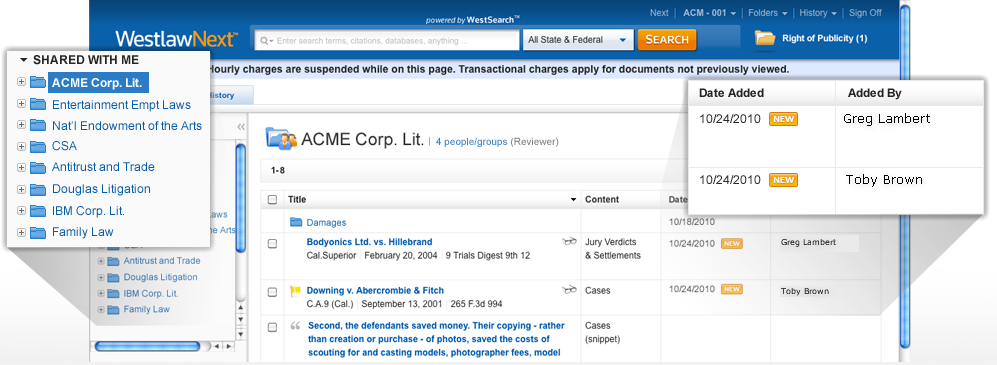
When I first saw the WestlawNext (WLN) product back in January, there were two things that I thought were going to make WLN shine when it came to legal research. One of those features was available at launch, and the other just became available this week. The ability to build upon existing user reaction to searches in a way that improved future searches was something that impressed me, and showed that WLN could leverage the experts using the database as a way to improve the database. The second feature, released this week, is the ability for researchers to share folders amongst each other, and collaborate on research directly in WLN. Many firms have struggled with ways to improve collaboration on legal research project, and the WLN folder sharing option could create an easier way of cutting down on duplicative research, or multiple copies of research results that reside in multiple locations. Here are some screenshots of the WLN Folder Sharing feature.

For Law Librarians that conduct research on WLN, this could be one of those “golden opportunities” to be on the forefront of improving how legal research results are shared, and be seen as the leader of this improvement. Instead of researching for an individual attorney and emailing those results to him or her, a librarian could help organize the research folders on matters and share those results through the WLN folder sharing process, adding notes to the results and attaching the librarians name to those results. Now the librarian is not just a person “down in the library” but is actually a person on the team for that matter.

I discussed this with Mike Dahn, VP for WLN product development, and he agrees that this this not only helps put the librarian on the research team, but also for a “potential rebirth opportunity for the type of pathfinders and research starting guides that librarians used to put together all the time.” Dahn sees those types of materials in a way that makes them active learning resources where “librarians can not only help with the current matter, they can help with future matters proactively.”

Dahn expanded the “proactive” discussion to include the knowledge management angle as well. I poked at KM a few weeks ago and said the focus was now on making cool looking interfaces rather than leveraging existing work products, and even Toby talked about how lawyers don’t like the initial work that is involved in making KM a success (AKA “the hard work”). I think that Dahn must agree with our accessment of KM when he told me that his “experience has been that if knowledge management is something the end user has to ‘do’ – then it tends not to be very helpful. But if knowledge management is something that occurs naturally as part of the user’s workflow, then it can be incredibly useful.”

It will be interesting to see if librarians can use the new WLN Folder Sharing resource as yet another way to show the benefits of having quality library researchers on staff in law firms. Let us know if you’re already doing something like this at your firm, or plan to implement it in the future.

I’m sure everyone’s heard by now that Google has launched its own e-reader.
Now, I’m no business whiz, but when I see a third, large company enter the foray in a marketplace that is already dominated by two–let’s say Westlaw and Lexis–usually the third one doesn’t do so well.
Why?
People don’t like making decisions. If you give them too many choices they get confused. That’s why, if you look at every major industry, there are usually just two that really stand out. I dare you to name one that doesn’t.
I don’t mean to preach the voice of doom on the Goog. What could happen is that someone is knocked out by the competition.
The Goog thinks it can take them all on.
My prediction? Amazon and Apple will stay strong. The Goog will start placing its app on the other devices. Then, in a brilliant move, Amazon will allow the Goog to put its app on their device. Maybe Jobs will let that happen but I don’t know …
Just the way I see it.

I was joking around with Sarah Glassmeyer on Twitter yesterday that the graph she did on Thomson Reuters acquisitions would explode if she added in all the mega-company acquisitions from 2010. Although today’s news about TR becoming the primary printing and binding shop for the American Bar Association isn’t exactly an acquisition, it does louden that sucking sound that represents the legal publishing world.

“With this new printing arrangement with Thomson Reuters, we’re able to better manage the production and delivery of our books,” said Bryan Kay, director, ABA Publishing. “We can more efficiently produce and grow the list of high-quality publications, covering a broad range of topics that the legal profession counts on from the ABA.”
Printing and manufacturing services for the ABA’s publications will be performed at Thomson Reuters’ 1.3 million-square-foot manufacturing, distribution and engineering facilities headquarted in Eagan, Minn.

Lexis isn’t standing still either in consolidating legal publishing into a true duopoly. They announced earlier this week that they were acquiring State Net, right after they off-loaded Congressional Information Service (CIS) and University Publications of America to ProQuest. This makes me wonder how long it will take TR to gobble up ProQuest.

As for the ABA/TR deal, it probably makes sense for the ABA to outsource the primary printing operations to an established shop like TR… and with the reduced demand for TR’s legal publications, it is most likely a “win-win” for both parties.

The Law Library staff at the University of Michigan (MLaw) has launched an educational campaign promoting the key benefits that the library offers. The library promotion points out the benefits that can help a student succeed during their time in law school. The MLaw Library Director, Margaret Leary, ticks off a few of the benefits they want to remind the students that are available in the law library:

  • a quite place to study
  • experts to help them with Legal Practice assignments
  • student journal work
  • research for seminar papers
  • selection of note topics for student journal competitions
  • and a lot more…
In addition to the poster campaign, MLaw Library is also promoting its Ask A Law Librarian live chat reference. (I actually used this service to get in touch with the folks at MLaw Library to prepare this story!!) The library still offers tradition email, phone and (gasp!) live in-person help, in addition to the chat service.
“The posters are augmented by new MLaw Library pins we wore during orientation, enhanced orientation sessions for the 1L’s and each student journal, and a new “lunch and learn” on Sundays, aimed at the student journals but open to anyone,” Leary explained in an email. She also knows that in addition to getting to those 1L’s early, it is also important to give them something to remember you by. Apparently, the quickest way to the 1L’s heart is through their stomachs. Leary goes on to claim that “the Library was the first to give the 1L’s free pizza, forever endearing them to us!” 
There are a number of posters hung around the law school promoting the library services and benefits to students, faculty and anyone else that wanders into the law library. Here’s the blurb for the poster promotion:

We’ve just launched an educational campaign to introduce students to library staff and remind students of some of the key benefits associated with library services. We want to keep the library’s tremendous resources front-and-center in the minds of our students as they consider research projects and papers in the course of the year. This “flipbook” presentation will introduce you to the posters appearing now throughout the Law School.

Go check out the posters and see if it piques your interest in how putting reminders of the services you provide “front-and-center” of your customers, clients, patrons, etc. helps determine the value that they see in you.

Not everything that you need to use at work has to be expensive. In fact, many of us use free or open source software all the time. So, this week’s Elephant Post question is:

What Free (or very low-cost) Product do you use everyday that helps you accomplish your job?

Although the saying of “you get what you pay for” usually applies, there are some products that are out there that don’t cost a dime, yet are extremely useful. I have become a big fan of the collaboration you can do with Google Docs, or apps like Flipboard to follow information flowing from my friends on Twitter. Both of these are free, but very useful products. Here are a few more products that our contributors use… and you might want to check out, too! Law Librarian Perspective TweetDeck Scott Bailey Great way to set up searches and monitor topics across social media sites. Tired of logging into Facebook and Twitter and LinkedIn separately? Posting separately? This is the ticket. Set up searches and view profiles quickly. Legal Research/Competitive Intelligence Perspective WatchThatPage Greg Lambert One of the best resources I use is the free website watching tool called Watch That Page. If you need to track when things change on a website, then you will want to check this site out. It has been around for a number of years now and hasn’t really changed at all in that time. You put in the sites you want to track, the times of day you want it checked, and you’ll get a single email back for all of those sites. I’ve used it for years to track new articles and alerts that peer law firms write. Since most of those firms don’t seem to understand what an RSS feed is, WatchThatPage shows me what’s new. Library Perspective CanLII Susannah Tredwell While CanLII (the Canadian Legal Information Institute) is well known to Canadian law librarians, it may not be so well known to those in the United States. CanLII is a free resource that carries federal, provincial and territorial case law and legislation. When I’m looking for recent (or even not-so-recent) Canadian case law, CanLII is my first choice. Case law is generally provided directly by the court so CanLII tends to be as up-to-date as any of the paid sources. It also has a fairly nifty point-in-time feature that allows you to compare two versions of legislation to see what exactly has changed.

Small Business Owner/Manager Perspective
Lindsay Shugerman, Owner, GAC Communications
I have what is euphemistically called a “small business.” What that means is I have four people for whom I need to keep some sort of reasonably accurate records. Stuff like when they’re not at work and why, or when they were hired (and on a bad day, why), and how I can reach their next of kin when they slip slowly under the table after a 3-days-straight-with-no-sleep project. Oh, and when their birthday is, so I can embarrass them with silly hats and cupcakes. You know, the important stuff in the business world.
I hate paper, so the file folder and forms route was NOT working for me. I could not see paying big bucks for some software package to keep track of our little amount of information, and Excel spreadsheets have been known to blow up on me with no warning. Seriously. I have witnesses.
So my favorite free business tool is something called Tracksmart. It’s a free, online (no paper!), employee attendance/absence tracking service that keeps my not-so-vast amounts of records safe and available. They have an upgraded version for over 20 employees, but for us micro-mini businesses, it’s free and easy. And no exploding spreadsheets required!
Library Perspective
E-laws is an indispensable tool for Ontario Law Librarians. It contains the official consolidated versions of Ontario laws and regulations. Even more valuable are the legislative tables which allow for easy(ish) tracking of legislative changes. I refer to it daily and point our articling students there regularly.

Lawyer in Social Media Perspective Drop Box Mike Mintz I don’t know how I ever lived a life online before Drop Box. This is not your daddy’s cloud computing online folder service; it’s all that, on steroids. The unique thing about Drop Box is that while you have online file storage, you also have the option of creating a folder directory within your existing My Documents file structure that allows you to full access to all of your DB files. This will also sync across all computers that have Drop Box installed with your account information, meaning forget USB keys, emailing yourself files, or even antique CD RWs – this little tool will allow you never to be file less again, and even if you are on a computer that doesn’t have a folder installed, you can retrieve what you need via the online Drop Box site. Free accounts start with 2GB of online storage (upgradable to 3GB if you get friends to join), and you can buy premium plans of 50GB and 100GB for $9.99 and $19.99 per month respectively. Welcome to the cult of Drop Box. Library Perspective Evernote Ellen Quinn The free source that I use every day, other than the business related databases that are available through our fabulous public library system, is a program called Evernote. If you are the sort of person who writes lists, notes and reminders on post-it notes and stick them all over your computer monitor then Evernote is for you. What makes Evernote more useful than most list making or note taking apps is that it is accessible from any computer or smart phone. You synchronize your notes on the Evernote web site. You can save notes in a variety of formats such as text, pictures, web sites or pdfs. You can assign subject tags to your notes, put them in folders and sort them by criteria such as date or title. There is a paid premium version of Evernote that allow you to search saved pdfs and save documents in other formats such as Word or Excel. Its hard to believe that something so incredibly useful is free and while there is advertising on the free version of Evernote it is unobtrusive. Library/Educational Technology Perspective Doodle and X1 Debbie Ginsberg and @debgpi One of my favorite free tools is Doodle. Doodle is an online scheduling system which is perfect for group meetings — no more sending out endless emails trying to figure out when everyone is free. I tell Doodle which times work for me. Doodle gives me a link that I send to whoever I’d like to schedule a meeting with. They click on the times which work for them. I can then pick a meeting date and time which works for everyone’s schedule. It’s that simple. As for low-cost software (under $50), X1 is one software app I can’t live without. After several years in one job, I have a lot of emails and documents, some in folders, some not, and some in folders which only made sense at the time. X1 indexes everything, including the full text of emails and documents, and lets users search by author, title/subject, folder name, document type, date, and full text. It even can search attachments, calendars, tasks, and network drives. Now I can find anything in just a few seconds. (Note: Xobni is a similar tool which is free, but I haven’t had as much luck with it so far but how well these tools work is often a matter of individual system configurations as anything else.) CI Perspective Fee Fie Foe Firm Emily Rushing Fee Fie Foe Firm! I smell…competitive intelligence? This site indexes US, UK/Commonwealth firm websites using a Google Custom Search Engine. Wondering who else is citing their representation of your top client? Looking for a benchmark practice with specific keywords? Need to find a law office in Outer Mongolia? FFFF can help, and at absolutely no cost. Fee Fie Foe Firm — Silly name; serious CI. Social Media/Online Marketing Google Analytics and Hoote Suite Lisa SalazarMeasure It and Treasure It!I use these freebies every day. WebTrends drove me bananas–I thought it was way too complicated. Google Analytics is probably nearly as complicated but I’m willing to put up with it because it is free. I had very poor customer service with WebTrends. I have yet to test that aspect of Google Analytics. But I bet even the worst customer service would make it tolerable because I am not paying a fortune to made to feel like an idiot.Hoote Suite is my baby. We see each other every day; interacting, exchanging sharing, making new content. It just keeps growing and growing every day, getting better and stronger! Its a great tool to manage multiple social media outlets. Originally designed for Twitter, it has now expanded to help manage Facebook, LinkedIn and other social media sites. Pretty easy to use, they also are starting to offer online tutorials. Next Week’s Elephant Post Question: What Surprised You The Most About Your Profession? Whether you are new to your profession, or are about to retire, there were some expectations you had when you came in that turned out to not be as you thought it would be. For example, I thought that working in a Law School as a law librarian would be free of politics… only to quickly realize that politics ran wild. So, I left that to join a court library… only to find out that it was even more political (the fact that I worked for elected officials should have clued me in.) Luckily, I’m now in BigLaw… oh crap… If you have a story to share, please do!! Shoot me an email or tweet me and I’ll give you instructions on how to contribute.

For the second year in a row the American Bar Association selected 3 Geeks and a Law Blog as one of the ABA Journal Blawg 100. We are excited about being selected, and wanted to thank all of you that read this blog, and a special thanks to all of the guest bloggers we’ve had this year.

Having a diverse group of bloggers helps 3 Geeks look at things from many different perspectives, and we think that helps keep the content of this blog interesting. Just this year, we had a dozen guest bloggers, and will have at least one more fresh perspective coming in a few days. For those of you that talk with me on the phone, you know my new catch-phrase is “Hey, that would make a great post on 3 Geeks… want to do that??”

Perhaps the best thing we did this year was create the weekly Elephant Post question. Scott Preston came up with this idea (after some beer and curry) as a way to get different perspectives from our peers, without having to come up with a post all on their own. The success of the Elephant Posts has been amazing, and we hope that if you haven’t tried your hand at answering one of the Elephant Post questions, that you will do so soon. It’s fun, and a great way to meet others in the legal field.

Enough of the horn blowing… now comes the part where shamelessly ask our readers to vote for 3 Geeks in the ABA Journal Blawg 100 category. This year we landed in the Legal Biz section, and we hope that you’ll take a couple of minutes to vote for us.

“VOTE GEEK” INSTRUCTIONS:

Although we are notoriously cheap (well… specifically me), we don’t have any contests to run to bribe you into voting for us, but, we’re always open to let you guest blog!! Now really… isn’t that much better than money??

There were two pieces of news coming out of LexisNexis today. The first was the announcement that ProQuest has acquired Congressional Information Services (CIS) and University Publications of America. The Second announcement was the launching of Reed Tech Web Archiving Services powered by Iterasi that will focus on preserving “web-based content to support the growing need for litigation protection, e-discovery, and compliance.”

Seems like LexisNexis is streamlining some of its products in anticipation of the upcoming split between their legal and risk departments. I’m assuming that the Reed Tech Web Archiving will be headed into the “Risk” portion, while the CIS portion makes the “Legal” portion a little lighter in the transition. Here’s a little more about the CIS move:

“As LexisNexis continues to transform its portfolio of products and services, we are very pleased to place this business unit with ProQuest as it is an excellent fit for them and their customers,” said Mike Simmons, senior vice president of Specialty Businesses at LexisNexis. “We look forward to working with ProQuest – including licensing back certain legislative content sets from ProQuest for our legal professional customers.”
CIS and UPA editorial staff members join ProQuest and will continue to be based in their Bethesda (MD) offices. Product names will remain the same, but will begin to include the ProQuest brand in 2011.

ProQuest has acquired the following LexisNexis products:
  • LexisNexis Congressional (to be renamed ProQuest Congressional)
  • LexisNexis Statistical Insight (to be renamed ProQuest Statistical Insight)
  • LexisNexis DataSets (to be renamed ProQuest DataSets)
  • LexisNexis Statutes at Large (to be renamed ProQuest Statutes at Large)
  • LexisNexis Government Periodical Index (to be renamed ProQuest Government Periodical Index)
  • LexisNexis Primary Sources in US History (to be renamed ProQuest Primary Sources in US History)
  • Congressional Hearings Digital Collection
  • Congressional Record Permanent Digital Collection
  • Congressional Research Digital Collection
  • US Serial Set Digital Collection
  • US Serial Set Maps Collection
  • All CIS microform and print products
  • All statistical microform and print products
  • All UPA microform collections
LexisNexis is retaining these academic-oriented products:
  • LexisNexis Academic
  • LexisNexis Library Express
  • LexisNexis Scholastic
  • LexisNexis State Capital
  • LexisNexis for Development Professionals


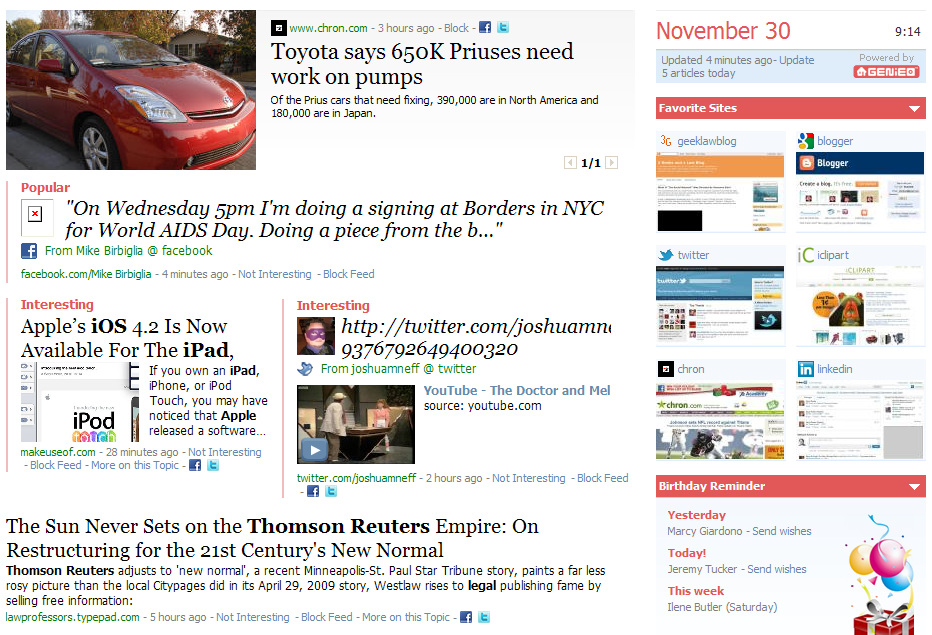
I ran across a little program called Genieo the other day, and after playing around with it, found it to be an interesting way to compile a pseudo-news page of things that are interesting to me. You can think of it as a product that combines some of the traits of those Twitter newspapers (Paper.li), iGoogle, and bookmarking resources. Genieo follows you as you surf the web and identifies the sites that are important to you, and builds updates from those sites that should be of interest to you.
Before going too far, I guess I should point out two things that might influence your ability to test this, or want to test it:

  1. It is a small program that is installed on your PC (no Mac support at this time). So, if your employer doesn’t allow that, then you’ll need to try it at home (unless your significant other doesn’t allow you to download programs at home…)
  2. It doesn’t follow you onto secure websites (those with “https” in the URL.) But, it will follow you everywhere else.
Although Genieo is promoted as a personalized “Home Page,” you don’t have to set it up as your home page. You can bookmark it or double-click the icon in the quick launch area to bring the latest version up in your browser. So, what exactly does Genieo do??
First of all, it is very similar to what you get in an RSS feed. It shows you new stories that have been posted on the sites that you follow. Whether it is the local newspaper site, or your favorite blogs, it will pull the new items posted on those sites and put them on your Genieo page.
It also brings in Facebook and Twitter contacts (if you allow the integration.) All those pictures and birthday reminders are right there in its own little space.
Genieo will bookmark those sites you visit the most and list those in the level of interest that you appear to have in them. You can manipulate those levels if you want, and delete those that you may visit, but don’t want to show up on your Genieo page.
There is a Mini Topic Filtering System that is used to categorize the information, and attempts to bring back only the most relevant items based on your usage. 
Live Updates help you track sports scores or company ticker information. There are also little notification windows that can pop up from time to time to let you know of new items that have been added to your Genieo page.
You can share the information directly from your Genieo page through Twitter, Facebook and more by clicking the appropriate share button next to the item, or you can even build your own magazine from all of the items that Genieo has compiled for you. (I haven’t actually been able to get a “clean” copy of this magazine to work yet, so maybe this one is still in the pre-beta-phase of production…)
I think that Genieo is a useful resource, but still needs a little bit of polishing to be something I’d use as my home page. It’s worth a look (if your boss lets you install little apps on your PC), so go to Genieo and test it out for yourself and let me know what you think.