I’ve had a rash of positive customer service experiences over the past couple of months and feel compelled to share them with you. We talk a lot on this blog about making your decisions (whether about a library’s collection, a marketing project, or fee pricing) in a client facing manner. My three experiences did exactly that, and each had a different aspect of what it means to be client facing and to look at the situation the client is in and make the best suggestions for the client. It wasn’t just about giving clients good customer service – that should be the floor of your customer service operation, not the ceiling – but, rather going the extra step to:

  • be better than the customer expects you to be;
  • listen to what the customer is actually saying and counsel them in the right direction, and;
  • know when you are not the best solution, but can point the customer to someone that is, even if that someone is a competitor.
Here are my three (non-law related) experiences that have made me think more about what I need to do to provide the best experience for my clients.
Guitar Center and the Cheap Guitar
I picked up a cheap guitar online a few months ago (somewhere around $125.00 – see picture above) because I really like the telecaster look, and it had a really cool design of a Texas flag on it. I didn’t really expect much from it, but when it arrived, it was pretty much unplayable. I knew that I needed to take it to a guitar shop and have it set up properly, but I dreaded going in with an off-brand guitar to a shop that sold Fenders and Gibsons. I was pretty sure I was going to get the answer of “geez, where did you get this thing?” and “I don’t think this is going to be playable… but let me show you some real guitars that you should have bought in the first place.” I actually waited a week before going in because I was pretty sure that was going to be my experience. However, I was dead wrong.
When I went into my local Guitar Center off of Westheimer here in Houston, I got the exact opposite experience. Instead of ridicule and salesmanship, I got treated like I was bringing in something special. The floor staff all came by and asked where I got the guitar. One told another that they should find something like this to sell in the store, and one showed me a picture on her iPhone of a guitar she painted for another customer as a Texas flag. The set-up man was busy working on a much more expensive Gibson Gold Top, but when he finished with that guitar (costing five times or more) he went to work on mine for nearly an hour and came back all smiles and told me that I would have a great time playing this guitar. 
The men and women at Guitar Center gave me a much better experience than I anticipated, it was sincere, and I walked away very happy. Needless to say, I’ve gone back and bought a number of things (probably some my wife thinks I don’t need) from that store since. 
Sears, the X-Box and the Blu-Ray

When I went looking for a game console, I went to Sears to pick one up. I knew I wanted the X-Box 360 and went in, found the salesman with the key to the cabinet, pointed it out to him and within a few minutes was ready to check out. However, I had a some money left on my gift card, so I told him that I really liked a Blu-Ray player my brother-in-law had and wanted to see if they had one like it. After looking at a few of them, I mentioned that I really wanted on for all of the online television, music and Internet options, as I already had a blu-ray player, but it didn’t have all of the bells and whistles like my the one my brother-in-law had. That’s when the salesman chimed in, lost a sale, but gained a customer.
I had the player picked out and was going to close the deal when he told me that if what I wanted was the bells and whistles, then I didn’t need the blu-ray player at all. Everything I needed, and more, was already included in the X-Box console I had waiting for me at the register. He even mentioned that Microsoft was doing an upgrade this month to make it even better. So, instead of plunking down another $180 for something I didn’t need, I simply walked back and paid for the game console. It was nice that someone listened to what I actually needed and guided me in the right direction. That’s the sort of thing that, as a customer, I remember and will tell my friends about.
The Software Consultant and the Competition

After seeing some of the results of the Lexis Advance platform and the High Performance Computer Clustering (HPCC) combination, I started looking around at other types of Hadoop options out there and ran across Pentaho. Pentaho, pronounced “Pen-TAH-ho”, is an open-source business intelligence software, but the software is packaged by the company with many add-on features that make it easy to use, and they also offer valuable consulting as well. I had a number of things that I wanted to test out with Pentaho, and when I talked with Rob Sampson it became apparent that there were a few things on my list that weren’t really doable with Pentaho. Now, it has been my experience that when you run across software that does many of the things you want, but is lacking in one or two areas, I get an answer similar to “that is in the works and should be out in the third quarter of next year” sales-speak. However, that was not the answer I got this time. Instead, I got pointed to some other open-source software that actually competes in the same space as Pentaho. 
Rob wasn’t thrilled pointing me to the other software – I think his exact words were “it pains me to say this, but…” – but, he did. However, he didn’t stop there and wish me luck on my project. Instead, he knew that a couple of the things I needed to do first could be handled by the competitor, and once that part of the project was finished, then his product could come in and complete the work. He listened to what I wanted to do, and he helped me understand that there were pieces that would need to be handled in different ways, with different software, and one of those pieces could be handled better by a competitor. Therefore, instead of trying to convince me to wait until some piece of vapor-ware product came out at the end of next year, he actually put me in a better position to start the project, and come back and evaluate his software when I was further along. That’s the type of customer service that gets you a long-term win by understanding that when you help someone with their overall goals, they’ll be back, or at least will give you good reference to their colleagues when asked for software solution suggestions.
Be Better – Listen – Guide
My three experiences have really made me think of how I approach those I support. It made me think that I need to give my customers a better experience than they expect, I need to listen to their needs over my own, and guide them in the right direction, even if that direction means someone else would be better at helping them achieve their objectives. Thanks to the helpful people and Guitar Center, Sears and Pentaho for helping me in ways beyond my initial request.

I’m sure everyone’s heard of the discovery of the second earth, affectionately called Kepler 22b, located 600 light years away.

Everyone’s saying we will never see it in our life time.

Well, maybe not.

Any Steve Hawking fans out there? Remember his movie,  A Brief History of Time and how he explained time travel?

And how about the newest, latest research that confirms faster-than-the-speed-of-light sub-particles?

Lisa Randall delves into some of these topics in her new book Knocking on Heaven’s Door: How Physics and Scientific Thinking Illuminate the Universe and the Modern World. A Harvard physicist, she has written a number of books that tied together the topics of sub-particles, physics, nature and art.

A mathematician at heart, she has always delved into the natural aspects of math in the world and how we can predict the future by looking at current science and its place in nature.

Sounds sensible to me–it’s kind pretty much the way that I look at things. For me, art has always been a great predictor of science. Da Vinci knew we would fly. It just took us centuries before we had the technology developed to accomplish his vision. Hannah Barbra’s Jetsons knew we would have phones that let us see each other–a few 40 years later, we know have Skype. Orson Scott Card wrote about blogging in his book, Ender’s Game, which was written in 1985.

I don’t think it is too far fetched to think that some of you who are reading this might see the day when we get there.

I wonder if it will be me … ?

Many of you have probably played Boardroom Bingo, Buzz-word Bingo, or maybe even Consultant-Speak Bingo… I thought I’d get your Friday started right with a friendly game of Twitter Bingo.

Take a look at the Bingo card below, and whip out your handy-dandy bingo marker (a dark highlighter will work, too) and mark off each box throughout the day when you see a tweet that matches the information in the box.

Shout out “BINGO!!” in the comments when you get 5-across, down or diagonal. Once that runs, we can play “postage stamp” or “four-corners.” I’m pretty sure that by the end of the day (maybe even before Noon) we’ll have someone with a completely blacked-out card!!

[Click on the Image to Print]

CLICK ON THE IMAGE TO PRINT!

Last Sunday, I did my Christmas shopping in a half hour. Online, of course.

But if I had waited, I could have used Google Catalog, a just released app available for iPhones, iPads and Androids.

It is pretty cool, using some of the same functionality that Conde Naste was testing out with their magazines in 2009.

First, it has the usual beautiful navigation and zoom-in imagery. Then the items link to the store web site for easy ordering. The catalog can also include videos but I don’t see any in the 20 our so catalogs that I looked at.
Another kind of weird feature is the collage. You can mark items as favorites and save them to a “collage” space then share it with your friends. Kind of odd, but I am sure fascinating to some.  Yes, I am one of those but don’t really have a desire to share my wish list–although I did favorite a lot of stuff.

I can see organizations like the ABA, LexisNexis or Westlaw using this app to showcase their wares.

As much fun as I have talking shop about Thomson Reuters or LexisNexis on the blog… I also like to have some geeky fun with online resources like WolframAlpha. Today, I thought I’d walk through ten cool searches (some of them may actually be useful, too… but mostly they are just for fun.

Flights Overhead

1. Flights Overhead
Link

When I lived in Oklahoma (one of those states that probably all of you have flown over), the sky was filled with the vapor trails of airplanes going from one part of the country to another. Now that I’m in Houston, usually the planes are heading for InterContinental or Hobby airports… or so I thought. By using WolframAlpha’s “Flights Overhead” search, it turns out there are actually quite of few planes that are simply continuing their journey to points outside of Houston. Plus, it turns out there are a lot of private chartered flights as well. WolframAlpha takes information compiled from the Federal Aviation Administration and calculates your current location (you can add your zip code to the search if it cannot locate where you are at the moment), then it gives you back a chart of the flights that should be visible from your location, the airline, altitude and distance. You can even click on the specific flight and find out where it originated, and its destination.

2. Create a Password
Link

Need to create a good password, but you’ve run out of ways to spell your dog’s name? Use WolframAlpha to create one for you. If you type in “password” into the textbox and let WolframAlpha do the hard work for you. You can set the number of characters of the password by adding “## character” to the computation. It also allows you to select if certain types of characters are optional/required/disallowed by clicking on the specific password link.

3. Create a QR Code
Link

QR codes are all the rage… just ask any law librarian that’s been to a conference in the past year! Need to make one in a hurry? Go to WolframAlpha and type in “QR Code” and the text you want converted to the fabulous QR code. The one on the right is a link right back to this blog (so, don’t worry about being directed to another site!)

4. Create a Barcode
Link

More of a traditionalist? Think that QR Codes are a fad and not going to last much longer?  Then what you’re looking for is a barcode generator. Don’t worry, WolframAlpha is ready for you. Instead of entering QR Code, enter “barcode ______’ So, for all of those barcodes that have fallen off your library books, go to WolframAlpha and print them back out.

5. Get an Analyst Rating on Stocks
Link

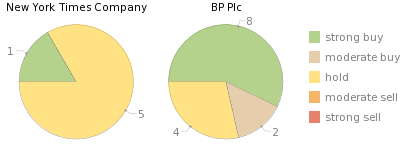
Analyst ratings on public companies are available on WolframAlpha and easy to access by entering “Analyst Ratings [Ticker], [Another Ticker]”.
You can compare multiple public companies at one time and have ratings graphed out for you. So, if you want to see if you should hold on to your NYT stock or buy more BP stock, then you can get the analysis comparisons easily through this computation.

6. Population Comparison
Link

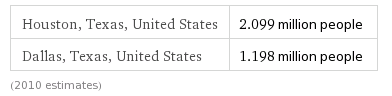
Although population isn’t the only form of comparing two cities, it is clear from this chart that Houston is 75% better larger than Dallas according to the 2010 census estimates. Of course, the Dallas folks might think this is not a fair comparison. However, even in comparing temperatures last year between Dallas and Houston, Houston is one to two degrees better warmer than Dallas! (Wait… is that a good or bad thing??)

7. Median Wage Between Two States
Link

Deciding after law school which state you want to practice in? You can enter something like “median wage of Ohio lawyers vs. Texas Lawyers” in the computation box of WolframAlpha and come back with the stats to show you which state bar exam you should start studying. Choosing between Texas and Ohio? According to the 2008 estimates, you’ve got nearly 17,000 reasons to choose Texas. (That doesn’t even count the “no income tax” reasons.) Of course, the 2008 stats probably don’t count all the layoffs either… You can also compare other professions such as Librarians.

8.  Know How Far Away You Are From Uranus (snicker…)
Link

Kidding aside… need to help your kid with their Astronomy home work, but you don’t want to knock the dust off you old set of encyclopedias? You can enter “distance Earth, Uranus” and get the stats in a flash. You can add in additional planets if you need to answer that question, too. You don’t have to leave Earth to get good information either. Want to compare the Atlantic and Pacific Oceans? Simply type in “Atlantic Ocean, Pacific Ocean” and get details on both in a handy side-by-side comparison chart.

9. Just How Distant a Relative Is Your Cousin??
Link

So you’re at a funeral and you run into your “cousin” who happens to be your Grandmother’s Sister’s Daughter’s Son… just what exactly does that make him?? Grab your iPad (what?? I think it’s okay to bring an iPad to a funeral… your great-grand aunt isn’t going to mind) and open your WolframAlpha App you bought for $2.99 and find out that he’s your second cousin.

10. Know How Much Tuition is Going To Cost
Link

Your son or daughter has done well on their SAT scores, and despite you telling them to go into a profession like engineering or accounting, they’ve decided to major in History with a minor in Poly Sci and need you to help with tuition.
They want to go to Harvard, Yale, Stanford, of Texas, and you need to quickly decide which one you can send them to without wiping out your retirement savings account. Type in “tuition Harvard, Yale, Stanford, and University of Texas” in WolframAlpha and get a quick comparison of the four schools. Texas it is!! (Of course, if you’re really frugal, add in University of Oklahoma and you’ll save twice as much over Texas.)

11. Random Fun
Link

As if the ten computations I just listed weren’t random enough… If you want to test out some other types of searches you can do on WolframAlpha, click on the “random” link or the examples link to see more details on the type of computations that WolframAlpha can do. Remember, this isn’t a search engine like Google, so some of the data may be a bit dated, and their are limits to things it can do. However, it can be a lot of fun, and very interesting to walk through some of the examples to see just how powerful the WolframAlpha Computation  Knowledge Engine can be. If you find something really cool, share it with us by putting it in the comments section below.

Recently I came to the conclusion that the proper way to make a bold statement without having to truly defend it is by adding a question mark to the end of it. That way you can say you are only implying a possible outcome and not actually making a statement. This blog post, in contrast, is a statement.
When people talk about alternative fee arrangements (AFAs) there is a tendency to focus on the fact that lawyers are slow to actually adopt them. In Texas we refer to this as all hat, no cattle. The implication of this thinking is that that AFAs are not embedded in the legal market and therefore things have not changed. In my experience, the real question should be focused on whether traditional law firm billing practices still exist.
In my presentations and various meetings with lawyers, I always enjoy the moment when one lawyer invariable says, “I don’t do AFAs.” My response usually starts with, “Oh – so your clients are fine with your rate?” Or, “Do your clients ask for budgets?” These and other questions lead to a discussion which quickly changes tenor. We immediately start talking about how things have fundamentally changed. But for some very specific exceptions, the old days of naming your rate and billing your time are gone.
So instead of focusing on how many clients are using fixed fees, I believe the conversation needs to be redirected to what is the current pricing dynamic between clients and lawyers?
What has really changed is that buyers are now embracing a more informed and empowered role. Some might call this a Buyers’ Market, but I think that over-states and over-simplifies the case. Instead I think of it as an emergence of a competitive pricing market – one where participants now engage in real price negotiating activities.
My claim is that traditional billing is dead. Some people don’t know it yet and continue to act as if it still exists. But the change is already here. Of course exceptions will always exist, but the new rule is competitive pricing.
The real question is when will people figure this out?
(Had to end with a question mark.)

I had planned on writing an extensive review on the new release of LexisNexis’ “Lexis Advance” platform like I did back in March on their Advance for Associates platform. However, Bob Ambrogi did such a great job of it over at his LawSites blog, that I really didn’t want to re-hash what Bob already covered.

Last week, I got a preview of the product and what I wanted to focus on was a couple of things that I think Lexis got right, or at least is moving in the right direction on in the ways to release big products without shoving the release down the throats of their customers and the future of searching massive amounts of data.

Enticing Customers into New Product

First of all, the new platform is not being sold as a “modest premium” product. Instead, Lexis is enticing customers to move over to this product as part of their existing contract (a contract addendum will need to be signed), with the expectations that once they’ve been exposed to the new features, they will become more comfortable with Advance and will migrate themselves off of the Lexis.com product. In other words, they are trusting the customer to make the decision to move when they are ready, rather than attempting to push the customer into the new platform through high-pressure sales and hinting that staying with the old platform is somehow akin to malpractice as we have seen with other big launches.

Lexis is also working with the customer to roll out the new platform in a way that doesn’t just throw everyone in the deep end of the pool and asks them to learn to swim. Lexis is offering extensive training for the individual firms before they roll out the product to the users of the firm, and Lexis will also work with the firms to make the transition a little more seamless, especially if the firms have established “bill back” procedures, so that firms aren’t scrambling to create new processes to fit the new platform. In the novel approach, Lexis is making the new product fit the firm’s existing processes.

Handling Big Data and using Data Analytics Through HPCC

A little over a year ago, LexisNexis announced that it was splitting into a Risk and Legal division, and I think we are seeing one of the first success stories coming out of this split with the integration of the High-Performance Cluster Computing (HPCC) analytics tool into the legal platform. Lexis Advance is applying the work that HPCC has performed on the Public Records side of the Lexis house, and create a method for identifying entities automatically in the legal content. For example, lawyers and law firms are now automatically identified and an additional 80 million links now exist for an estimated one million lawyers and 60 million new links for law firms. The HPCC process isn’t like the old “best guess” method used in the past, however. It is extremely accurate and creates a potential for achieving what one of my favorite “Big Data Thinkers”, Jeff Jonas of IBM, calls the process where a system is created “where the data finds the data, and the relevance finds the consumer.” Through the establishment of Enterprise Control Language (ECL), no longer does Lexis need to create distinct databases and tables for specific information like attorney names, judges, law firms, etc. The ECL process will now organize this on the fly and in a way that produces a faster update for the new content Lexis ads, plus a faster search process for the consumer.

For a geek like me, the HPCC integration will lead to much more relevant ways of the data finding data [PDF] and relevance finding the customer than just on proper nouns. At this time, I’m not sure even Lexis realizes all the potential that can be accomplished in the HPCC platform. With all of the data at the fingertips of Lexis’ parent company (Reed Elsevier), just think of the possibilities of adding in news, science, technology, and other seemingly unrelated data clusters and allowing the data to discover each other.

Lexis Advance Fact Sheet

For those that didn’t go over to Bob Ambrogi’s review (you should), here is a quick fact sheet on Lexis Advance

Further information and videos about Lexis Advance are available at: www.lexisnexis.com/newlexis/advance/


Launch: December 2011

What: Lexis Advance is an innovative, all-new online legal research solution from LexisNexis that promises to transform how legal professionals conduct research.


Why: LexisNexis developed Lexis Advance with input and participation by more than 36,000 lawyers, law librarians and other legal professionals to create a solution that meets their specific needs in today’s dynamic legal sector.


Users: Lexis Advance is primarily targeted for use by professionals within a law firm, corporation or public institution who conduct the majority of legal research for their organization.


What’s Different Now: LexisNexis launched Lexis Advance for Solos in 2010 and Lexis Advance for Law Schools BETA earlier in 2011. These two solutions were specifically built with and for small law and law students respectively.
The Lexis Advance product launched Dec. 5 builds on those products and introduces new features and innovations specifically designed for researchers in law firms, corporations, government and academic institutions.
LexisNexis announced in March 2011 that this product would be given the name Lexis Advance for Associates. After continued dialog and interaction with customers, it became clear that other legal professionals beyond associates would use the product. Therefore, based on customer input, LexisNexis shortened the name to Lexis Advance for release.


Key Features: Lexis Advance contains innovative new features desired by legal researchers:

  • Integrated results from the open Web: Users can search the open Web along with premium content from the LexisNexis® services simultaneously in one step. 
  • Workplace Carousel: A visual and intuitive carousel interface that allows the user to store search history, save recent and favorite filters, access work folders, set up alerts and access customer service. 
  • Legal Issue Trail: LexisNexis intelligence helps users find and cite connections between cases that may not be obvious – ensuring that research is complete.

Mobile: Users can access Lexis Advance on the go via mobile browser or through native Apple® iPhone® and iPad® applications.

Premium Innovations: Lexis Advance also includes two premium innovations:

  • Research Map: A graphical depiction of prior research history that quickly helps a user visualize searches while validating the completeness of search results.
  • Shepard’s® Graphical: Shows the history of citing decisions in an easy visual grid or map format so users can quickly ensure they can identify valid law versus what has been overruled.

User Benefits: Lexis Advance helps legal researchers find the right information faster, uncover and assess key insights more efficiently and managed their results with ease. These gains in speed, efficiency and relevance translate into the ability to create better outcomes for a professional’s firm, company or client.

Content: Content available through Lexis Advance corresponds to a customer’s lexis.com subscription. For many customers, this includes:

  • Comprehensive and fully enhanced primary law from all states 
  • News – top titles from the most comprehensive collection of news sources in the industry. 
  • Matthew Bender – a wide range of industry-leading treatises and expert legal analysis. 
  • Jury verdicts, briefs, pleadings and motions 
  • LexisNexis CourtLink content 
  • Expert witness transcripts, depositions, and curricula vitae

Pricing: Customers with a subscription to lexis.com will be able to access and use the core functionality of Lexis Advance and the two new premium innovations – Research Map and Shepard’s Graphical – at no additional cost for the life of their contract.
Subscribers can always search all content on Lexis Advance at no additional charge, even if the content searched is not part of their subscription plan. Before accessing a document outside their subscription, Lexis Advance shows a free preview of the document and its actual price prior to ordering. Over time, LexisNexis will develop more premium innovations that build on the Lexis Advance core functionality that customers can add to their service for an additional cost.

Roll Out Schedule: Lexis Advance launches starting Dec. 5, 2011 with initial customer activations are being scheduled from December through February with LexisNexis sales teams already working with customers to set up appropriate dates for activation.


lexis.com: lexis.com continues and is not changed as a result of the launch of Lexis Advance

PC/Mac: Lexis Advance will work on both PC and Mac computers.

What’s Next: LexisNexis will announce further innovations in the first quarter of 2012.

By now you may have heard that Thomson Reuters CEO, Tom Glocer will step down at the end of the year and the current COO, James Smith, will take over at TRI. In a year of turmoil for TRI, plus watching its stock value drop over 36 percent this year (see chart), it wasn’t surprising to see this move coming. In a way, the whole TRI situation seems to look a lot like another industry that had three major players, all of whom did extremely well during the good times, and all of whom thought that they were pretty much invincible in the marketplace because people knew their brand, were loyal to that brand, and would buy them year after year without question.

In my opinion, Thomson Reuters made a major mistake under Glocer’s time as CEO. They went Big… very big. As much as we in the legal area of their wing would love to point out the problems that TRI ran into with their WestlawNext platform release and “modest premium” selling pitch, it was really the Eikon fiasco on the financial side of the TRI empire that has stung the most, and has caused the Thomson family to sit up and take notice of what was happening to their company, and their wealth. Although Eikon and WestlawNext are two different products, they suffer from the same error in judgement. Somehow, TRI thought that what its customers needed was more “SUV” type products. Big, expensive databases that packed as many luxuries as possible, and each of those luxuries came with a premium price tag. Now that we are nearly two years into the process for both Eikon and WestlawNext, sales are sluggish, stock prices are down, and customers are not happy. That is not a good combination for a CEO, and Glocer took the fall for the bad planning.

Customers aren’t locked into the TRI products, and what’s worse, they are quite happy to go to a faster, lighter, cheaper model of resources such as Morningstar, or even use low-cost or free products like Fidelity Investments or the SEC website instead of the TRI alternatives which are massive and expensive. It’s just not the 1990’s and early 2000’s anymore… we’re in a time when customers have choices, and are quite willing to move to different platforms that will work almost as well, at a much greater savings to their own bottom line.

One of the funny things that I’ve seen throughout this year is the nostalgia of what the old Thomson Publishing company used to be. Usually, it comes from those of us in the library field that remember when we had a good relationship with our local vendor representative, and that relationship was built on understanding each other’s needs and building a trust between each other. Now I’m seeing the nostalgia coming out of the Thomson family and what their company used to mean to them before they went public and turned it over to those who only care about the next quarterly statement and how to impress the stockholders. TRI somewhere along the line lost its way and forgot what it was that made it a good company. Now it just looks like any other company out there pushing to improve its stock price by cutting staff, increasing prices on services, and all the other tricks that make stockholders happy, and at the same time, make their customers start looking at other places to take their business.

The Old Thomson is dead. It will never be back. The new TRI isn’t necessarily dying, but I’d say that it is very sick and needs to take another look at how it is going to go forward from this point. I’m hoping that James Smith has been given direction from the Thomson family to take a look back at what the customers are needing, rather than what Wall Street, or the Toronto Stock Exchange is needing. If they don’t, there won’t be an Occupy TRI movement to worry about, there will be a flee TRI movement.
 

When Emily Clasper stood in front of a group of “eager to learn librarians” to discuss a class on 21st Century Search Trends, she was shocked that when she came to a PowerPoint slide that discussed Search Engine Optimization (SEO), the slide might as well looked like this:

Η βελτιστοποίηση μηχανών αναζήτησης

It seemed that many of the librarians in the audience had not heard of the term before, and I imagine that the minutes she spent discussing SEO strategies sounded much like the teacher in the Charlie Brown cartoons (“wamp waa waa waaa wamp”).

Clasper, who thought that SEO was something that every librarian should at least have the basic grasp of understanding, was a little shocked at the lack of knowledge coming from a group of people that should be some of the best users of online resources.

I mean, we need to use it, right? We have online resources, Web sites, and digital content we want to put into the hands of our patrons. We want to market our services and the opportunities we provide to our communities. We aim to remain relevant in the every day lives of the people we serve. So isn’t understanding and applying the basic principles of SEO to our digital environment kind of a big deal?

It did make me wonder where the disconnect came from between Librarians (at least the one’s in Emily’s audience… as I’m sure all the readers of this blog are SEO gurus, right??) and the value that SEO both as creators of information, and as consumers of information. Emily points out that as users of online resources, “aren’t we obligated to understand as much as we can about where our information comes from?” If we don’t understand the basic concepts of why certain results are placed higher on the page than others, are we then blindly trusting search engines and the filters and rankers that are being used?

I started thinking about the other side of this coin and wondered if maybe librarians were thinking too narrowly on who their audience is today. As much as we hammer the idea that “the library” is not simply a place any longer, I think many librarians still see their audience as those that do come in to that place (perhaps expanded a bit to include those that make requests via email as well as physically come into the library.) Although the information we create online may be designed for those that hold a library card, or attend our university, or work in our company… should we simply limit the exposure of our information to those groups? Perhaps the understanding of SEO strategies can expand the reach of the information we collect beyond our traditional doorstep.

Traditionally, SEO strategies have been housed in the Marketing or Internet Technology groups, and not in the library. Therefore, if the library wants to understand if these strategies can help expand our internal and external reach, the first step would be to find those who define your organization’s SEO strategies and determine what you need to be doing to be included in that strategy. Search isn’t just about the basic Boolean “AND OR NOT” structure any longer. A better understanding of Search Engine Optimization will make you a better consumer of information as well as a better contributor of information.

Want to buy this Plush Android?

I just bought my first Android.

I know, I know. I was just saying that I just got an iPhone 3.

Well, I dropped the damn thing. And ATT wanted to charge me $250 for the privilege of buying either iPhone 4 for $99 or the 4S for $199. Well, I may be clumsy, but I’m not stupid.

The next best, cheapest option was the SamSung Galaxy S at $150–my first step down the slippery slope towards Androidism.

I’m liking it better than I thought.

Even tho it feels like a fake phone–it is even lighter than my iPhone–it has a bigger screen than the iPhone 3. Although it doesn’t fit as nicely in my hand. And, let’s face it, the aesthetics to the iPhone are just nicer.

But the coolest feature so far? Swype. I had written about Swype back in August of 2010–“Touch Pads and Fingernails: Swype Has a Solution“–and I love it so much more than typing on a touch screen.

And let’s not forget Google, who is pushing for world domination. The entire phone is driven by my Google account.

So I have succumbed to the inevitableness of my paltry little life. A Google sheep I shall be.

Until a better deal comes around!