[NOTE: I asked my colleague, Jonathan Owens, to write a guest post to discuss the eBook he wrote on Calculating Court Deadlines and some of the questions he addresses within the firm regarding court dockets. His eBook is available for download on the iPadKindle and Nook devices.]

In my many years of working as a docketing professional for a large law firm, I have been asked the following questions more times than I could count.


1) How are the additional days afforded for service added?

While the question seems straightforward, the answer has many layers. Depending on your jurisdiction, the days could be added to the period and counted directly from the trigger date (i.e., 30 days plus 3 calendar days for service would be 33 days from the trigger date – fairly simple). Other jurisdictions, Federal Court included, you would count your initial period as directed in the rules and then add any additional days for service. This type of calculation is a major point of confusion as many initial periods would land on a weekend and then move to the next court date. So, we’d have to move to the next court date before adding the additional days for service (i.e., 30 days from trigger date might land on a Saturday; we would move to next court and then add 3 calendar days – this would essentially give us 35 days to respond).

2) How do you know when we can add the additional days for service?

The additional days for service are only allowed when the rule, statute or court order specifically state “from service” in the calculation. Sounds simple enough, but not necessarily. I’ve seen many an order that states something along the lines of “plaintiff shall have 10 days to file an amended complaint.” The order was filed and entered on the docket which may have included service upon the plaintiff by ECF. Most jurisdictions allow the additional days for service by ECF, so one might assume the 3 days could be afforded in this case. While the order in this example is vague in what date is triggering the 10 day period, the mention of “from service” is definitely not included. Unless that word “service” is in the rule, I would never be comfortable adding those additional days.

3) How do you know which way to move for a deadline landing on a weekend or holiday?

All jurisdictions will address how to move if a date lands on a weekend or holiday. The problem lies in the ones that don’t specifically state what to do if you are counting backwards from a trigger event. Those that do not usually state “if a due date lands on a weekend or holiday, move to the next court date.” It’s not uncommon to have an attorney or paralegal interpret the next court date to be the ensuing Monday (or Tuesday if that Monday happened to be a holiday). While that interpretation of the rule is not without merit, I personally recommend to continue moving backwards to the Friday before (or Thursday if that Friday happened to be a holiday).

After being asked these questions over and over again (the same questions I had posed myself when I began my career docketing), I found the lack of resources available which addressed these legal issues frustrating. So I thought if I can’t find the resources I need, I would try and make them myself. The result was my self-published Court Deadline Calculation guide “Calculating Court Deadlines: How to Apply the Rules for Computation of Time”. Included in this is an overview of how to apply the rules and then a comprehensive overview for each jurisdiction. I’m hopeful the end result will be a useful tool for those unfamiliar with the process entirely (the initial overview chapters should be an excellent introduction to calculating deadlines) and those very familiar with calculating deadlines (the comprehensive state-by-state overview allows quick access to the calculation rules).

An example of Florida’s overview chapter is below:

[keys to civil and appellate rules with link to main court page and civil rule authority sited]
[appellate rule authority sited and example calculation]
The eBook is currently available for purchase on the iPad, Kindle and Nook.


Last Wednesday, my wife and I were on day 3 of a 4 day Vermont cheese and maple syrup tour.  It was about noon on the hottest day of the year and we were driving down Route 35, about 30 miles from anywhere you’ve ever heard of, when I took a sharp corner and quickly swerved to avoid a piece of debris in middle of the road.  It looked like a rope or a piece of rubber, but the thud as I rolled over it made clear that my initial assessment was off. Then the tire pressure light on the dashboard lit up.

I popped the trunk, saw that there was a spare, but no jack or tire iron, then pulled out my phone and realized I had no signal.  A flat tire, 3 miles from nowhere, no jack, no tire iron, and no cell signal in the heat of the day on the hottest day of the year.  We flagged down a passing car and got a ride into Grafton where we hoped to find a cell signal.

I was grouchy, hot, frustrated, trying to remember if I had ever actually changed a tire and what the steps were, wondering if we were going to make it to the next bed and breakfast, whether we should call ahead, how much it was going to cost me to cancel, wondering how we could keep any cheese we buy from melting, I really wasn’t thinking clearly at that point.  I pulled out my phone and started up my Zipcar app.

We live in New York City, and as people with more sense than money, we don’t own a car.  Zipcar is a car sharing service that allows us to reserve local cars for use on an hourly or daily basis.  Their app allows us to make reservations, and report damage to the car, but the best feature by far is the big orange button in the upper right corner that simply says “Call Zipcar”.

I hit the button and got Debbie on the line.  I stammered incoherently, “Flat tire…Outside Grafton…No Jack…Help, please.” “I’m so sorry about that”, she said cheerfully, “let’s see what we can do?”  I gave her the details of where we were, where the car was, and where we were staying that night.  “OK, stay near the cell tower, I’ll call you back in a few minutes.”
A few minutes later she called back with news that someone would pick us up in Grafton, drive us to our car and change our tire. She found a tire place near the B&B we were staying that night and called ahead to make sure they had a tire that fit.
It all happened just as she said, and when we got to the garage in Manchester, they had a new tire ready and waiting for us.  In the room at the B&B, I snapped a picture of my tire receipt, emailed it to Debbie, and within a few minutes had confirmation that my credit card on file with Zipcar had been reimbursed the cost of the tire.  It had been an adventure, but relatively painless considering the situation we were in just a few short hours before. 
This got me thinking, as many things do, about law firms.  My situation on the side of the road in middle of nowhere Vermont is not unlike the situation many clients are in before they call their attorney.  No one calls their attorney just to check in and say that everything is going well.  You call on the hottest day of the year, when your metaphorical car is in a ditch with a flat and you’re missing a jack and a tire iron.  You call when you need help, often when you are not thinking straight and when you need someone else with the knowledge, resources, and capacity to do the thinking for you. You could argue that the answer to one of my earlier posts, is that we are selling the knowledge, resources, and capacity to do your legal thinking for you.
But there is one big, glaring difference between Zipcar and the legal industry.  The person solving my problem is a customer service rep, but my relationship is with the car service, not with the rep. If I hit the big orange button and Debbie is unavailable, or busy helping someone else, then I’ll get another qualified person, with access to the exact same tools and resources that Debbie has, to ensure that I get out of my jam as quickly and painlessly as possible.  After my flat tire experience, I’m a Zipcar believer and I am truly grateful to Debbie for all she did, but should she choose to move on to Hertz, or Avis, I will probably continue to work with Zipcar. They created a loyal client in me by making every aspect of my terrible experience as easy and painless as possible, from the app with the big orange button, to arranging all of my roadside and garage service needs, to reimbursing me for my out of pocket expense with nothing more than a cell phone photo emailed to customer service.  Debbie was absolutely integral to my positive experience, but it was the tools, resources, and relationships provided by Zipcar that allowed Debbie to so efficiently solve my problem.  Why should law firms be any different?

This will get me in trouble, but attorneys are the most expensive client service representatives ever.  That is not in any way intended to diminish their importance.  Good client service reps are absolutely necessary, but not nearly sufficient to provide a good client experience.  The greatest lawyer in the world without the right tools, resources, and relationships is still going to be a very good lawyer, but will not likely provide an optimal experience to their clients.  The tools, resources, and many of the relationships that attorneys use on behalf of their clients are provided by the firm and yet, GC’s have been known to say things like “We hire the lawyer, not the law firm.” That mindset has made the modern BigLaw firm little more than shared office space for “partners” always on the lookout for another firm that will promise them a larger cut of profits. 

To create an optimal client experience, the primary client relationship needs to be with the service provider, and the service provider in this case is the firm not the attorney. As I said in my previous article linked above, I think we are selling “access to the collective knowledge and expertise of the firm”. Otherwise, there is no benefit for the client in hiring a BigLaw attorney. They are paying a premium for the prestige of the names on the letterhead, but getting the efforts of a solo or, more likely, a couple of young associates in return.

How can we begin to change the client/firm relationship?  We’ll all have to work together.  First, Attorneys need to stop the merry-go-round of lateral defections in pursuit of a few more points, and to put some of that energy into making their current firm a more effective and pleasant place to work.  Secondly, firms need to provide tools and resources to clients that actively build relationships at the firm level and they need to develop a culture within the firm that facilitates sharing of resources and knowledge between attorneys rather than simply sharing infrastructure. Finally, clients need to demand a relationship at the firm level, and then they need to have the courage of their convictions to stick with any firm that gives them that relationship, even if “their attorney” jumps ship.  

I’m not suggesting this would be easy or even possible, but if we could strengthen the relationships between clients and firms, and change the underlying culture of our firms to share resources like any other functional service provider does, then we too could give our client’s a big orange button that says “Call Firm” to be pressed when the client is in trouble and needs someone else to do their legal thinking for them and get them back “on the road” as quickly and painlessly as possible.

Debbie was a terrific representative for Zipcar, but I wonder how my experience would have differed had I hired the customer service rep, instead of the car rental service.  

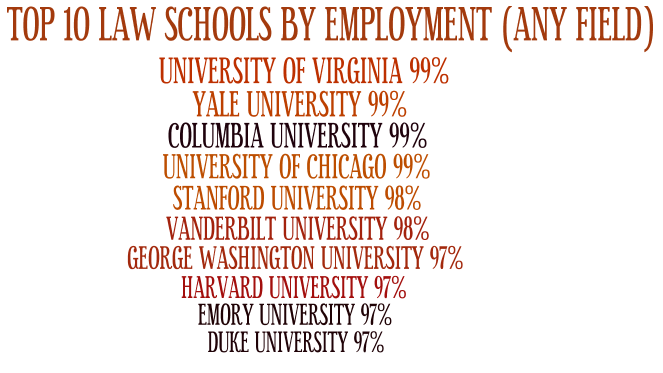
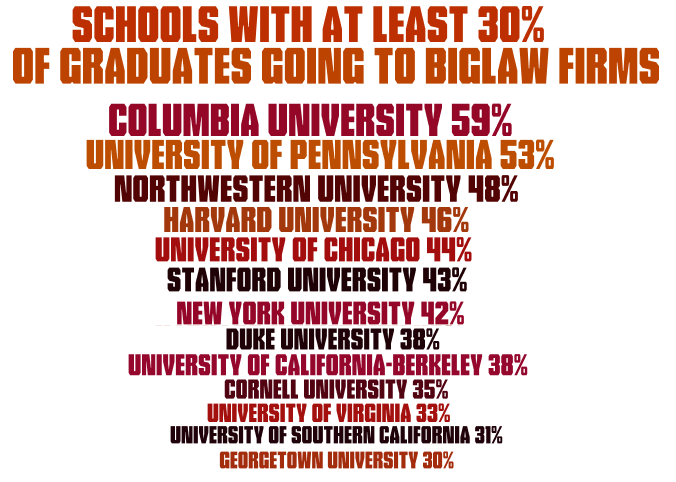
After discussing the sad ABA’s Law School Graduate Employment Data with Toby yesterday, he mentioned that it would be kind of cool to see some of the stats broken out into a Wordle to see which schools stood out in a “visual” way. So, just for fun, I started playing around with some of the good and bad stats based on number of graduates and the type of employment those graduates reported have. One of the things that I kept noticing as I went through the “good” numbers, was how often the University of Virginia (UVA) kept ranking near the top. Of course, these are very generic statistics (and we all know the issues surrounding the ‘fudging’ of stats by schools lately), but just looking at these, it was pretty clear that if you want to jump out of law school and have a job, UVA is one of the best options for you. Just in case you were wondering… the University of Puerto Rico, and Whittier College consistently hold down the bottom of most of the statistics.

Here’s some of the stats that I compiled out of the data and formatted into a Wordle… enjoy.

Full-Time Employment that requires a JD


Any Employment that requires a JD


NON-JD EMPLOYMENT


(AKA – “Screw it… I gotta get a job!”)


UNEMPLOYMENT


EMPLOYMENT (ALL FIELDS)


BEST CHANCE FOR 


BIGLAW EMPLOYMENT


Image [cc] MyTudut

I always enjoy an interesting convergence of ideas. Recently three news items hit my radar that appeared unrelated, until I gave them each a second look and more thought. The first item was the release of the whitepaper from Reuters (of Thomson / Westlaw and Pangea3, the LPO). The paper is entitled, LPO 2.0: the Next Phase of Legal Process Outsourcing Industry. I have previously noted the risk that LPOs will take business from law firms. This was validated in the whitepaper, by this money-shot quote:

Since 2005, the breadth of the services that have been performed and offered offshore has increased dramatically as the industry has become more sophisticated, especially in the areas of litigation, corporate transactional work, and governance, risk management and compliance. Not only are services growing in number, but services that have long been offered by LPO providers are growing to encompass more, and are being packaged as end-to-end solutions.

My prior post on this threat to firms noted the ethics police are apparently not seeing this as a clear ethics or UPL issue, so the door is wide open for this type of competitor. And from the looks of the whitepaper, the LPOs are kicking it open even wider.

Item #2 – “In Washington State, ‘Legal Technicians’ Will Be Allowed to Help Civil Litigants” The Supreme Court there is making this change to enable better access to justice. Here’s the money-shot quote:

“But there are people who need only limited levels of assistance that can be provided by nonlawyers trained and overseen within the frameworks of the regulator system. … This assistance should be available and affordable. Our system of justice requires it. The court acknowledged concerns that the plan poses a threat to the practicing family law bar. But ‘protecting the monopoly status of attorneys in any practice area is not a legitimate objective,’”

And what do these two things have in common? Both are reactions to the failure of lawyers to meet market needs. LPOs sit at the top of the market. These new “Legal Technician” will sit at the bottom. 

Greg (a.k.a. #1) brought home the all of this with a comment he made about the article “Only 55 percent of law grads found full-time law jobs.” He wondered why so many lawyers can’t find jobs when there is so much need for them.

So at both the top and bottom of the legal market, non-lawyers are filling needs. Meanwhile lawyers can’t find jobs. What is wrong with this picture? Where is the invisible hand of Adam Smith when we need it?

My read on this: High demand existing alongside over-supply brings further evidence that lawyers lack a basic understanding of market forces. The days of lawyers getting work because they are good lawyers are over. Lawyers need to embrace a market driven view of the world and focus on meeting the needs of clients. It’s either that or get out of the way and let the market do its thing.

I ran across a fun blog run by a Brooklyn, New York public librarian called Screwy Decimal, where Rita Meade has a number of tongue-in-cheek posts about her life in the library and her constant struggle to fight Mayor Bloomberg’s efforts to cut public library funding. It’s a fun, award winning, blog with a solid message… sprinkled with posts of kids saying the darnedest things, and tricking her into saying “underwear.” There was one post that I read that really caught my attention, and made me wonder if I, as a law librarian at a law firm, would be brave enough to ask the same question.

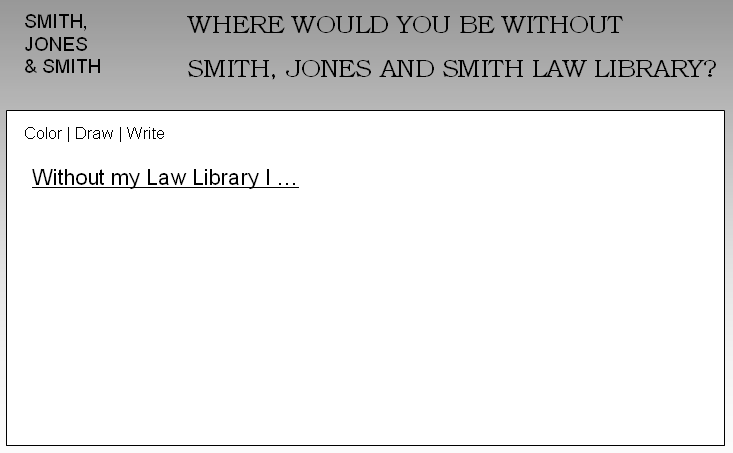
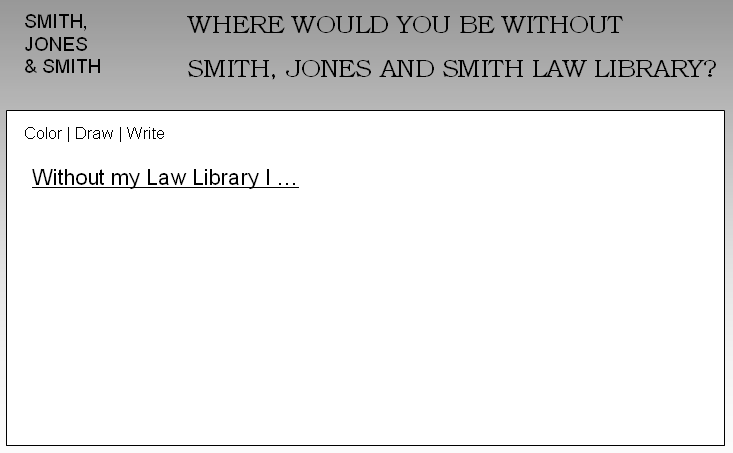
In her post Where Would You Be Without Your Library?, Meade discusses their Summer Reading Kickoff event where they created a sheet that they handed out to all the kids to fill out that asked the question “Where would you be without Brooklyn Public Library” and started off the answer with “Without my Library I ….”  The answers were wonderful, and some would make my wife start crying (she says I’m hollow inside, so such honest responses would be wasted on an emotional black hole such as myself… okay, I might have sniffled at a couple of them.)

Between sniffles, however, I started wondering if someone like me would be brave enough to ask the users of my library the same question?? It is a scary thought to think that some lawyer might answer in a negative way. “Without my law library I could convert that space into a corner office with the best view in the firm!” However, I think asking just this question may help expose some of the honest answers that the public library received. We may even be surprised by the answers that we get, in that they expose a value that the attorney gets from us that we may never have guessed on our own.

Exposing yourself and your library like this is scary to think about. Would you be willing to put a form like this out to your firm??
[note: Beth Holmes made a great suggestion that this should be modified to say “Without my Law Library/Librarian I …]

If there is one consistent theme that comes from the folks at Fastcase, it is that they are not afraid to challenge the status quo. This time around, Fastcase is putting fresh spin on the old idea of providing advanced sheet of court opinions in a compiled format. The format this time around, is eBooks via Kindle, Android and Nook. To make things really interesting, Fastcase is providing these eBook Advance Sheets for free.

Fastcase CEO, Ed Walters gives a great overview of what they are doing below. I’ve tested out a few of these via my iPad and Kindle (Ed sent me some .mobi and .epub examples), and they have a nice clean look and feel about them. The idea of replacing those heavy paperback advanced sheets with a eBook version is something that should appeal to those that continue to get Advanced Sheets.

I had a brief conversation with Jason Wilson about the usage of Advance Sheets in the age of Westlaw/Lexis/Bloomberg, and we both came to the consensus that Advance Sheets aren’t as heavily used as they were a few years ago. However, the idea of being able to download them onto a convenient platform like an iPad or Kindle Fire, may make a number of attorneys bring back that experience.

The other shortcoming that we could think of in this example is that there is not synopsis provided by Fastcase for the Advance Sheets. Granted, that would be a big investment for Fastcase, and perhaps in the age of electronic data, a synopsis isn’t necessarily as important as it used to be.

Here is Ed Walters’ introduction to Fastcase Advance Sheets. The Advance Sheets themselves will be downloadable through iTunes, Amazon and Google Play, as well as directly from Fastcase at their eBooks page.

Today we’re excited to share a glimpse of the future — a pre-release version of Fastcase Advance Sheets, a series of eBooks available this week for free on iPad, Kindle, Android, and Nook devices.

Fastcase Advance Sheets give lawyers a first look at judicial opinions from around the country in eBook format, replacing printed law books.  They are the first of five Fastcase eBook products that will be released this year to disrupt the $5 billion legal publishing market.

Background

The term “advance sheet” has been used for more than a hundred years to describe the paperback drafts mailed to lawyers and libraries before the printing of paper books. Subscriptions to the advance sheets alone cost upwards of $850 per year, for each of nine or ten series of reporters – the final books cost even more.  Lawyers in years past would thumb through advance sheets from their jurisdiction, looking for decisions of interest in their field.

But with the proliferation of judicial opinions, nobody can carry around all the paper books, much less scan through them for important rulings.  Even though the volume of decisions has dramatically increased, nobody has really re-thought the way we publish caselaw reporters since the late 1800s, when John B. West created the regional reporter system that became West Publishing Company.

Nobody until now.  The companies that print paper books can’t or won’t re-invent the industry, but Fastcase can and will.

Fastcase Advance Sheets

Fastcase has replaced the heavy, voluminous, redundant caselaw reporter with modern eBooks that are slim, light, and beautiful.  Fastcase’s Advance Sheets are more comprehensive than traditional paper tomes, because they include all decided cases – even “unpublished” opinions that won’t be printed in the books (but which are precedential in many courts, and often contain persuasive authority).

And because the Fastcase collection is in eBook format, it will work on most e-readers, including iPad, Kindle, Nook, and Android tablets.  That also means that text can be highlighted, copied, shared, annotated, rotated, read on an airplane or train, or even on a beach.  And instead of reading an entire paper advance sheet, Fastcase’s eBooks can be searched for key terms, and they include introductory summaries highlighting the issues in each case.

Unlike their paper counterparts, Fastcase Advance Sheets will be free.

Because Fastcase already collects these opinions for its desktop legal research service, publishing them in eBook format is simple, and the marginal cost is low.  So Fastcase offers them for free, consistent with our mission of democratizing the law and building smarter tools for legal research.  Fastcase also will introduce a series of paid eBooks later in the year, with advanced features and highlighting particular subject areas – so lawyers can follow the latest cases in their chosen field.  But the Advance Sheets will continue as a free product, under a Creative Commons license.

About Fastcase Advance Sheets for eBooks:

  • Each book publishes one month’s judicial opinions (designated as published and unpublished) for specific states or courts
  • Available for iPad, Kindle, Android, Nook, and other e-readers
  • 40 volumes published this week, approximately 300 more by the end of the month
  • Advance sheets for each state, federal circuit, and U.S. Supreme Court
  • Volumes begin with summaries of opinions included
  • Fully searchable, with highlights, annotations, bookmarks, and other key features
  • Free, and licensed under Creative Commons BY-SA license.

About Fastcase:

  • Disrupting the legal publishing market with smarter tools for legal research since 1999
  • More than 500,000 subscribers from around the world
  • Affiliated with 22 state bar associations and dozens of voluntary bar associations
  • Market leader in mobile research according to 2011 ABA Technology Survey, with apps for iOS and Android devices

Awards:

Image [cc] tracktwentynine

I have read Mia Breitkopf’s article on Roy Tennant’s Wake-Up Call to Academic Librarians multiple times over the past few days and continue to think of parallels that run between what Tennant warned the Academic Librarians Conference attendees, and the red flags that private law firm librarians should see in our environments. The academic librarians (University librarians, not Law School librarians) face what Tennant labeled “The Four Horsemen of the Library Apocalypse,” and to many of you that are in law firm libraries, these will look very familiar:

  • Unsustainable Costs
  • Viable Alternatives
  • Declining Usage
  • New Patron Demands
Breitkopf broke down Tennant’s arguments in four topics, and my brain started altering these to fit what we face in law firms:
  • Law Firm Libraries Face Big Challenges
  • What the Law Firm Librarian Should Provide for Attorneys/Clients
  • What the Law Firm Librarians Should Provide for Administration
  • Tugging Your Law Firm Library Into the Future
The challenges are huge for law firm libraries. Perhaps never before has the traditional library looked as obsolete as it does now… and holding on to traditional services essentially means slowly killing the library altogether. 

What we provide to attorneys and clients is far different that what we provided five or ten years ago. The traditional usage (think reference desk) has declined, but the demands on a quality reference librarian have never been as complicated as they are at this very moment. Whether the librarians are embedded into practice areas, or make themselves de facto members of the practice groups by keeping their ears opened to understand the needs of the team and proactively fulfill those needs even before the attorneys realize their needs, the opportunities are there for librarians to step up, think differently and active aggressively to being part of the overall process.
It’s great seeing these types of discussion and realizing that our struggles are not unique. This has been a topic that we’ve discussed on this blog ad nauseum. However, there are many more parallels in Tennant’s arguments. I highly suggest that you check out Breitkopf’s post and start thinking of your own parallels and how you are defining the future of your library.
Image [cc] wikimedia

On Wednesday I had the pleasure of meeting with Tom Baldwin and Scott Preston to discuss LPM and general law firm challenges. One subject came up that triggered a repressed memory. Tom mentioned the importance of the users’ experience  – UX or UI (user interface) depending on your perspective – when seeking adoption of new technologies. Having a proper UI expert has proven to be so important that he has contracted to have some work not only on upcoming projects, but also review a few of their existing custom developed apps.

This comment triggered the release of a repressed memory from a recent software training I ‘experienced.’ The software in question is actually very functional. It may be the most functional in its class. However, the user interface is from 1990. One might argue that functionality reigns supreme, since that is what users really need form technology. But at a point in the training all of my frustrations came in to focus. For the umpteenth time, I watched the trainer go through the same 10 or so clicks to initiate a ‘new file.’ That task should really be one click. For the first portion of the training I was excusing the UI’s ancient look and feel, but then it occurred to me bad UI is also a significant productivity issue.

Add on top of that Tom’s note that user adoption rates are strongly impacted by UX and you have a compelling reason to employ a UI expert for every software project. I implore IT professionals to always make UI / UX a priority in your development efforts, even if it’s just a SharePoint update.

With that off my chest – I will re-engage my memory suppression efforts.

Image [cc] MysteryStevenson1

I ran across a summarizing tool that I think all of you would enjoy testing out. I found it through the Tools 4 Noobs website which focuses on PHP resources, but this can be used specifically from their “Summarize” tab on the website (no coding required… but, more on that below.)

I’ve run through a number of different web pages and copied PDF texts from Court filings, and found this summarizer to be pretty good.

Here’s the basic principles of what it does:

  1. Extract sentences from the text given.
  2. Identify the keywords in the text and count each word’s relevance.
  3. Identify the sentences with most relevant keywords and output them based on the options selected.

It also gives you some options to play around with to improve your results.

I took this PDF of a Plaintiff’s Original Complaint (7 pages), and got this as the summary:

Summary:

PRAYER For the reasons set forth above, Plaintiff respectfully prays that Defendants be cited to appear and answer herein, and for the following relief: a. that the Court enter an order allowing this action to proceed as a collective action under the FLSA and directing notice to the Workers; b. judgment awarding Plaintiff and the Workers all unpaid wages and unpaid overtime pay, liquidated damages, and attorneys’ fees and costs under the FLSA; c. an award of pre-judgment and post-judgment interest on all amounts awarded at the highest rate allowable by law; and d. all such other and further relief to which Plaintiff and similarly-situated employees may show themselves to be justly entitled.
Defendants failed to pay Plaintiff at the minimum wage and failed to pay Plaintiff at one and one-half time his regular rate of pay for hours worked in excess of forty (40) hours per each seven (7) day workweek.
Defendants’ practices of not paying Plaintiff and similarly-situated employees at the minimum wage and failing to pay at one and one-half times the regular rate of pay for all hours worked in excess of forty (40) hours per each seven (7) day workweek are direct violations of the FLSA.
Plaintiff and similarly-situated employees were entitled to overtime pay at one and one-half times their regular rates of pay for all hours worked in excess of forty (40) in a workweek.

For the IT folks, apparently you can purchase the coding for this ($60.00 for developer license or $15 for personal) and integrate it into the enterprise.

Looks pretty cool to me. Any ideas on what could be done with a product like this?? I was thinking how it could improve newsletters that Library staff create, or how about putting a summary like this in the DMS that allow us to see a summary of documents at a glance, rather than having to scroll through the preview (or worse, actually having to open the documents.)

Image [cc] David Ortez

The consumerization of technology is a hot topic in the legal market. But one overlooked corner of the market also experiencing this trend is the courts. Today’s guest post comes from inside the courts to examine the same phenomenon there. Judge David Nuffer, of the Federal District Court in Utah, offers this insider’s view of how federal judges are embracing consumer technology. Judge Nuffer is also a past-president of the Utah State Bar and just generally a nice guy.
According to a recent report, 58% of Federal Judges use an iPad for their court work.  Two-thirds of the iPads in use are iPad2s.  As expected, the tech-savvy (and tech-dependent) community of bankruptcy judges leads with a 70% use rate.  For a device introduced only two years ago, and a very conservative user base, this is a remarkable rate of market penetration.

The iPads have replaced laptops for many judges.  Judges find the iPad very intuitive and less daunting than a laptop, and IT staff finds the iPad easier to support and less prone to technical issues.

According to surveys, federal judges use the iPad most for email, where the iPad’s large screen beats smaller mobile devices for easy reading of emails and attachments.  Most judges also use an iPad for general reading because electronically filed documents are all PDF format.  Apps such as PDF Expert, iAnnotate and Goodreader work well with these PDF documents.  The documents can be annotated while reading and the annotations persist when the document is returned to chambers storage servers.  Judges appreciate the ability to take voluminous documents with them in the same device they use for email.  This results in less printing of electronically filed papers.

iPads, using the native keyboard or Apple’s quiet Bluetooth keyboard, are often used for courtroom notetaking.  Judges also use the iPad to refer to checklists and guides while on the bench.

Some judges use remote desktop control apps to gain access to full features of their court computers.  The Federal Judicial Center, the educational arm of the federal courts, makes podcasts of judicial conferences and seminars available for download to the iPad. The speech-to-text dictation feature of the new iPad holds promise for judges.  Unfortunately, this feature won’t work with earlier models.

Challenges with iPad include the courts’ continued use of WordPerfect, which has no editor for the iPad.  While WordPerfect documents may be read on the iPad, they cannot be effectively edited.  Those chambers which have moved to use Microsoft Word have several editor options on the iPad but none as robust as are needed for complicated documents with footnotes and tables of contents.  Another challenge for judges is the concern about security of documents “in the cloud” and the peer-to-peer nature of many cloud storage applications.

Counsel submitting documents in the federal electronic filing system can make documents friendly for the iPad by ensuring that text-based PDF documents are filed – or if a scanned exhibit must be filed, run OCR on it before filing.  These text based PDF documents are much easier to search and annotate.  Also, bookmarks (automatically generated by most word processors and preserved in PDF conversion) make PDF documents easy to navigate.  Finally, knowing a judge may read on the iPad could motivate wise use of color and inclusion of graphics.