[We’re happy to have Ed Walters, CEO of Fastcase, as our guest blogger]

Greg Lambert issued a dire proclamation here the other day: If Law.Gov remains an exercise in Academia . . . It Will Die.  His post noted that there were no government officials in Law.Gov’s initial list of 33 co-convenors, and that their buy-in would be key to moving from principles to action.  Although Greg is almost certainly right about the conclusion, the diagnosis is premature.

First, these are just the signatories to the Law.gov statement of principles, not the full list of supporters.  As Joe Hodnicki and others have pointed out, even though the list of co-convenors includes some very prestigious names, it is much smaller than the list of people supporting the effort.  As a small example, Law.Gov workshop participants included:

Preeta Bansal, General Counsel and Senior Policy Advisor to the Office of Management and Budget
Debra Bowen, California Secretary of State
David Mao, the Deputy Law Librarian of Congress,
Vivek Kundra, The White House Chief Information Officer
Ray Mosley, Director of the Office of the Federal Register
Beth Noveck, Deputy Chief Technology Officer for The White House
Laurence Tribe, Senior Counselor for Access to Justice from the Department of Justice
Paul Verkuil, the Chairman of the Administrative Conference of the United States
Michael Wash, Chief Information Officer of the Government Printing Office

Although many of these participants spoke for themselves and not their respective agencies, the process of winning buy-in from key government officials is well under way.

Second, although buy-in is key, courts and government officials will likely be later-adopters.  And that’s okay.

If you look at the history of liberating government data, many times (but not always) it’s private industry and entrepreneurial individuals who move first and show the government what’s possible.  Then enlightened individuals within the government re-structure their data feeds or their own sites to make the jobs of entrepreneurs easier (and get some tech cred for their agency at the same time).

One good example of this is the way Carl Malamud worked to put SEC filings online in the 1990s.  It was much easier for him as an individual to put the filings online himself as a proof of concept than it was for the SEC to find the financial and human resources internally to do that work.  Once Carl proved that it was possible, he was able to hand the database and its maintenance off to the SEC (which still successfully runs it today).

Recent examples abound.  Harlan Yu, a grad student at Princeton’s CTIP built FedThread.org, and a small group of developers built govpulse.us, each a cool, innovative way to look at the Federal Register.  So now Ray Mosley, the Director of the Office of the Federal Register, is working closely with both groups and has just launched Federal Register 2.0.  Innovators start the process, but the government can often use their momentum and vision to innovate as well.

The key next steps for Law.Gov will come from entrepreneurs who inventory public law and who build tools that make that law more publically available.  And there is no shortage of innovative personnel here, either in the co-convenors list, the list of participants, or the list of supporters.  When innovators such as Tom Bruce and Peter Martin at LII, Paul Lomio and Erika Wayne at Stanford Law School, Tim Stanley at Justia, the team at Princeton’s CTIP (like Ed Felten, Harlan Yu and Steve Schultze), and maybe some of the more entrepreneurial publishers like our team at Fastcase can agree on standards, we can start organizing parts of the collection, and opening them up online.  (By the way, there’s a lot of firepower in that paragraph, folks.)

Heck, even traditional publishers have a part to play.  LexisNexis participated in many of the Law.Gov workshops, including CEO Mike Walsh.  Imagine the impact LexisNexis could have in this effort by, for example, disclaiming copyright in state statutes for the eight-or-so states where they claim it.  (Don’t be surprised if the traditional publishers get involved. As I’ve pointed out elsewhere, better access to public law should be market-enhancing for existing publishers.)  This is a case where private industry involvement early on can be even more influential than the involvement of some state governments.

So although it’s correct to note that the effort will need buy-in from the government, that buy-in might not be as necessary at this stage.  Now is the time for smart people in the open government movement, law schools, law libraries, state bar associations, and law firms to inventory the state of our public law.  Now is the time for innovators to begin publishing, repurposing, and mashing up government data in new and interesting ways.  In the next stages, I’m confident that the smart people at GPO, The White House, the Law Library of Congress, in state courts, legislatures, and elsewhere, will pick up the ball and run with it.

As Greg points out, the Law.Gov statement of principles is a good start that needs buy-in from the government.  Although I’m not surprised that government officials aren’t early signatories, I will be very surprised if we don’t see a lot of innovation (private, then public) in the Law.Gov movement.

Flipboard’s “Cover” Is Visually Stimulating

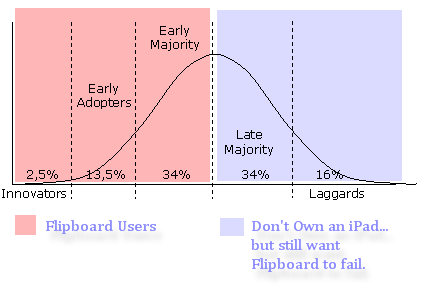
With Google’s announcement yesterday that it is going to wind down Google Wave at the end of the year and move the pieces around to other products, the blogosphere and twitterverse have been full of “Ha!! You early adopters can suck it!!” comments. There’s also a lot of discussion of what’s early adopter product can we expect to fail next? One product that I’ve seen mentioned is the iPad social media viewer Flipboard. I’m going to stick my neck out on this one and say that it will not fail like Google Wave did, and that I find it to be both a useful and a fascinating resource to use to keep up with news, social media, and other forms of media and entertainment.

Here are a few of the reasons that I think that Flipboard will not become the next Google Wave.

  1. It is visually stimulating.
  2. It is very easy to use.
  3. It is a fast way to get information.
  4. It is on a platform filled with early adopters and early majority users.
  5. It is an enhancement of… not replacement of other social media tools.
  6. It stands in a space all to itself.

A few days ago, Scott Preston asked if there was a Windows product that rivaled Flipboard. No one could come up with anything that they could point to that would be a direct competitor to Flipboard (especially in the Windows market.) Perhaps as other tablet devices are released, the competition will grow.

I saw some comments this morning that people are abandoning Flipboard because it is not an RSS feed reader like Google Reader. That is true, and if you’re looking for an RSS reader, then there are a number of products out there (I primarily use Google Reader… but I hear there are other good products.) However, if you absolutely won’t use Flipboard because it doesn’t work as an RSS reader, then here is a workaround that I found from a Flipboard community bulletin board:
  • Make a folder in gReader and fill it with feeds you want Flipboard to have.
  • Make the folder public.
  • Create a new Twitter account.
  • Use an RSS to Twitter service to spit the feed from the public folder into the new Twitter account.
  • Follow that account with Flipboard.

I haven’t tried this yet, but I do like how you can follow Twitter Lists that you or others have set up. We still get a lot of hits on our “convert your Twitter Lists to RSS feeds” post that we did last year, so I know that people are still hungry for this type of information. Putting those lists in the Flipboard platform really makes it pop out at you, too!  The picture to the right is an example of taking @lawshucks/aba100 twitter list and turning it into content on Flipboard. I would have completely missed @corporette’s tweet on appropriate one-piece dresses for the workplace had it not been for Flipboard… and that would have been sad.

Flipboard is a fast way to get information from many different sources (twitter, facebook, news/entertainment feeds, etc.) However, it is not a one-stop, everything-you-could-ever-want resource. I follow 2,700+ people on Twitter, so even with Tweetdeck and other resources, I miss a lot of things. I’m okay with that. Using Flipboard… in addition to Tweetdeck… I get more of a chance to catch things as they swim by in the twitter stream of information. 

Google Wave failed primarily because it was a confusing tool to use. It looked cool in the demo, but once you jumped in, it was a monster to navigate and use effectively. Not so with Flipboard. My pre-teen daughters could set this thing up in a few minutes and start flipping through the content. Even better, my 72 year old Dad could also be flipping through the content and not blink an eye. It is easy to use, easy to set up, and easy to navigate. I’ve always loved the quote I used to get from when I was working in a mainframe shop at the University of Oklahoma – “Making something is pretty easy…. Making something easy is pretty difficult.” Flipboard developers have definitely made something easy.

Finally, I love the look and feel of the product. When I’m drinking coffee in the morning, I flip through the content and find all kinds of relevant and interesting things to read, watch and look at. It’s become my morning newpaper (and I haven’t had a morning newspaper delivered to my house in 10+ years.) Unless Flipboard starts charging for content, or gets shutdown for legal reasons, I don’t see any reason why I would stop using it.

When Scott suggested yesterday that we “Get the Conversation Out of Email“, my first reaction was “yeah… good luck with that, buddy!” Not that Scott wasn’t correct in his assessment that Outlook is a resource hog (actually it is a ‘sounder of resource hogs’), but the fact that everyone in a law firm uses email as their primary communications tool, and their habits are so ingrained that making them change would be a monumental task.  Like the Associate pictured on the right… they all want you to change the way Outlook works for them, not vice-versa.

People use Outlook in many ways that it just shouldn’t be used. There are many of us (myself included) that use it as a “cover my ***” resource. That’s where you save all of your emails just in case someone comes back and says “Why did you not tell me that ‘X’ was going to be thrown away??” That’s when I do a little think I like to call “Advanced Find…” tool in Outlook to pull that specific email that I sent that person two years ago reminding him that we were throwing away ‘X’ and if he wants us to keep it, he needs to let us know.

Some of us use Outlook as a de facto database resource where they store strings of email messages on a certain topic, all within a sub-folder of Outlook. Say, for example, that I have a folder called “Passwords” where I put emails that contain all of the different usernames and passwords for all of those different databases I have access to (not that I do… but someone might do something like that after IT told him not to write them down on post-it notes and attach them to the underside of their keyboard.)

And, of course, some use Outlook as a file storage system. Instead of saving that attachment in the proper folder in the firm’s document management system; it is placed in a folder… just in case we need that file somewhere down the road.

All of these are bad, bad, bad habits that everyone knows are slowing down Outlook, but they are all too set in their ways to stop doing the things that are bad for them. Besides, they argue that IT doesn’t understand that it would take them days, or weeks, or months to undo all the bad things they’ve done.  Although IT might be able to start changing the ways people use Outlook and get them to be better about using the DMS, deleting unnecessary emails, or finding other resources to use for communications, but these are habits learned over many years, and won’t be unlearned without a lot of coaxing/forcing, and changes in the way that Outlook itself works.

I’m afraid that IT is just going to have to take this bull by the horns and start by changing the way that Outlook works, and then start working on the end users bad habits. Using tools like Recommind’s Decisiv Email, or a nifty little tool I saw yesterday from InfoNgen called Email Prioritization [PDF], where they tag emails and move them to more ‘appropriate’ places, such as a DMS, is a nice start. Give us some social networking tools to have conversations outside of email. Implement some rules, such as retention or deletion policies, that force us to either move files out of email or delete them… or, if necessary, do that for the user that won’t do it. Their clients already do it… it’s time they got on board with those policies as well.

The process for IT is pretty simple. First change Outlook’s behavior… then change the user’s behavior. Yeah, good luck with that, buddy!

While I was at the AALL annual meeting in Denver last month, I talked with both of the major legal publishers and asked them if they could tie their online legal research tools (Westlaw & Lexis) to the print titles that their customers also subscribe. Of course, no one could give me a “yes” or “no” on that question because of the logistics surrounding accomplishing such a feat. However, here’s my idea, and if it sounds like a good one, then approach your local rep and start asking them to look into doing it. For every title that your law library subscribes to in print, the Westlaw or Lexis databases should identify those titles whenever they come back in a search result or database lookup. In my opinion, it should do so regardless of if you also subscribe to that same title in its electronic format.

What would be the value in letting researchers know that the print version of this resource is located in the library? It would seem to me that it would be a win-win-win situation for the researcher, the librarian and the vendor. The researcher would know that he or she could walk into the library and pull the resource off of the shelf, sit down and easily flip through the resource, finding all of the related resources that are not just found in that specific book, but also from the additional topical resources that physically surround that book within its placement within the library. We’ve all browsed the shelves before where we’ve found a great resource that just happened to be shelved next to the book we were intending to use for our research.

It is a win for the library because it has the potential of bringing foot traffic back into the library. With foot traffic comes opportunities to talk with those researchers (lawyers, judges, professors, paralegals, legal assistants, etc.) and build face-to-face relationships. Those relationships bring additional opportunities to market the library, solicit feedback from the researchers, and to make yourself and your library a bigger presence within your organization. What products like West km or Lexis AtVantage do for locally created content, this could do for locally held print collections.

How about adding a “Print Version In Library” Note??

It is a win for the vendors because it finally gives them a legitimate answer to the question “why should I duplicate print and electronic resources?” As Joe Hodnicki over at the Law Librarian Blog calls the de-duping of print and electronic resources “The Shed West Era“, it is clear that library collections are cancelling as many print titles as they can… starting with any that they have access to in their electronic form.

Not enough room for text?? How about a book icon with a pop-up note?

Perhaps this idea should have been implemented five years ago. However, it doesn’t mean that it is too late to benefit from the tying of the print and electronic resources together.

What do you think?? If the vendor placed an icon, or wording next to results that said that this resource is available in your library… would that interest your researchers enough to take a trip into the library to check it out??

I was having a discussion with some attorneys recently about making everything accessible from within Outlook. Their collective spin was that they spend all of their time in Outlook, so IT needs to make everything work from within Outlook. My response to this was, “We need to get rid of Outlook. Email clients like Outlook have been the worst thing for the legal profession since we were forced to transition away from WordPerfect 5.1.” You can only imagine the reaction I received from these attorneys. I was being a bit over the top, but sometimes you need a little drama to get people’s attention.

I am not suggesting that we abandon Outlook, though the insistence that everything work from within Outlook is causing serious performance issues. The real issue is that programs like Outlook tend to thwart the sharing of knowledge.

There is a great deal of institutional knowledge in email. Many conversations begin and end in email. And although we have the ability to save those conversations into a knowledge management system, the user needs to take some action, which requires consistency and time – time that most knowledge workers do not have. The unfortunate result is that we leave a lot of institutional knowledge (your firm’s collective knowledge, intellectual property and culture) on the table, only to disappear with the retirement of your firm’s thought leaders.

I do not have the fix for this just yet. But I do know that we need to appreciate the amount of information that is lost in emails. There are technologies available today that make it much easier to collect and repurpose this information. Threaded discussions (or forums) are one way to accomplish this. Social networking tools have the necessary features to extract information from discussions, apply tags to help categorize information, and at the very least, to store information in a way that makes it easy to index by search engines. Migrating users to this approach would require change and orchestrating change is difficult. There are some very interesting search engines that can infer meaning based on context and can cluster information based on concepts. One interesting approach to this problem is Recommind’s Decisiv Email. Decisiv does a great deal of the heavy lifting necessary to get email content into a system that provides fast and easy searching. They do this by making intelligent suggestions about how email should be filed. This same approach can (and should) apply to email tagging.

We need to start fixing this now. We are in the midst of an important transition as senior members of our workforce continue to retire, taking their knowledge with them. Past generations walked down the hall and met face to face – this is how institutional knowledge was passed on before the web changed our lives. Not only do we as individuals suffer from this lack of knowledge transfer, the entire organization suffers as well.

Let me start off by saying that I support the ideas, principles and declarations made by the 33 individuals that have placed their signatures on that statement. Putting the laws that we citizens live under in a format that is freely available, in a format that is not tied to a specific vendor or physical format, and having the institutions that write these laws responsible for making sure they are immediately available is a great idea. However, when I scan down the list of signatures of those supporting these ideals, I see something missing… and that is a signature from any members of the Judiciary, Legislative or Executive branch, state or federal, that would have the power to move these ideals forward. In fact, other than Judy Meadows, the State Law Librarian of Montana, all the other signatories are either members of top tier law schools, publishers, or individuals with no direct link to the courts or government agencies that they are asking to adopt these ideals.

It reminds me of when I was with the Oklahoma Supreme Court and we adopted the Universal Citation System for all of our cases based on the AALL Citation Format Committee’s guidelines. We started the process back in 1996 and by 2001 had all 60,000+ Oklahoma Appellate Court decisions online, with the vendor-neutral citations, and freely available to everyone. When I went up to a committee member in 2001 and said that we need to get the word out about Oklahoma’s success and start talking to other State Supreme Court Justices, Bar Associations and Court Administrators to get them to follow suit, you know what I got?? Nothing. The reason? The committee was no longer focusing on cases, and was now interested in finishing the guidelines for Administrative Rulings. The “process” of establishing additional guidelines trumped the “action” of getting courts to move forward on actually adopting and implementing the already established guidelines.

I really hope that the Law.Gov folks are not following in the footsteps of the AALL citation committee.

There is a lot of clout in having the signatures of Deans, Professors, and Law Librarians from distinguished schools like Harvard, Yale, Cornell, Princeton, Stanford, Berkeley and others, and that should not be dismissed as not important, because it is important. However, until you start getting some signatures from State Court Administrators, State and Federal Judges, Governors, State and Federal Legislators, and State and Federal Agency Directors, it is still an exercise in academia… and will never make it pass this phase.

Getting these types of signatures won’t be easy (if it was, they’d already be on there.) But, there are states out there that are doing very well at doing a number of things that the Law.Gov principles and declarations are asking them to do. Why not go out and recruit these Judges and state officials to sign in order to show their peers that it can be done, and what benefits they have reaped from already making their laws and regulations more transparent?? A State Supreme Court Justice is going to take notice of a peer from another state before he or she will listen to a law professor from an Ivy League school. Getting one of those signatures should be Law.Gov’s current mission.

[Note: See Ed Walter’s follow-up to this post – “Why .Gov is at the *End* of Law.Gov“]

I was at a party the other night and this guy was showing me his Android.

I really would like to have one but I was telling him that the touch screen gets in the way of my long nails. It is bad enough using the Blackberry keyboard with these nails.

Well, this guy showed me an app he uses: Swype.

With the touch of a finger, you can swipe out 40 words per minute. It is a QWERTY keyboard that is also smart enough to automatically identify blanks, capitalizations and misspellings. It also learns new words and adds it to its 65,000 word dictionary. and supports a number of foreign languages.

It’s been a while since we’ve mentioned anything about Wolfram Alpha’s “computational knowledge engine”, but they released a neat little tool to create your own widgets. The widget builder makes it very easy to set up your own widget where you set up your input and allow that input to be manipulated.

For example, I set up a simple widget to pull the nutritional value of something:

 I still haven’t found a lot of use for Wolfram Alpha when it comes to “legal research”, but it is still an outstanding resource for more technical type searching. Here are some good examples of other widgets that Wolfram Alpha featured on its blog today:

Very cool stuff!!  If you find a way to make this relevant to legal research, please share that with us!!

Two things jumped out at me in yesterday’s discussion on the PLL Listserv regarding paid online services:

  1. Firms are in the midst of a major debate on Cost Recovery
  2. Librarians are worried about the subscription services of the future

For #1, I have made clear my positions on cost recovery in both a blog post here and an article on the subject in Spectrum [pdf]. These lay out what I feel is a reasonable way to recover costs that is reasonable to both the client and firm. These costs are so onerous that Firms have to be able to recover them to stay in business. Whether it get’s built into rates, fees or remains a separate line item, doesn’t make a difference. The important thing is offsetting these huge expenses as much as possible to remain profitable.

As for #2, the future User Interface (UI for short), needs to be able to:

1) Search across all of my subscription resources

Our firms purchase content from multiple vendors and it is becoming more and more challenging for our attorneys to find the materials they need. They would be able to work better if they can access the online materials in the same way they do on the shelf. On the shelf, West materials sit in the same section as Lexis and so on. We have built a UI (Full Disclosure: our UI is hosted by LexisNexis) that allows attorneys to find materials based on how they work, not who publishes them. A tab is set aside for each practice and links to online materials are grouped in ways that mirror the way their workflow. For example, under the Litigation Tab you would have items grouped by Civil Pretrial/Discovery, Civil Trials & CiviL Appeals, not by West or Matthew Bender.

This is where I think WestlawNext tripped up. I have been involved in contracts for Lexis and Westlaw for over 20 years and every one of them was content-based. Over that period, we have seen some major evolution in both of these products, not the least of which was the shift from a software- to a web-based search platform. Not once during this time have I been charged extra for the changed UI. Now, if this allowed me to search across multiple platforms I might consider it worth the premium. But I can’t see justifying the extra expense to search just the same resources that I have been able to search for years without trouble.

2) Allow me to set the per search charge to meet my unique requirements (See the Spectrum Article referenced above)

3) Make research more efficient

There has been a lot of fuss this year made over WestlawNext, CCH IntelliConnect, FastCase and now Lexis Advance. At AALL in Denver, a distinguished panel of executives from West, FastCase & Lexis discussed how they developed their respective UIs. While the conversation was interesting (despite being sidetracked at one point into a debate over treatises vs. primary resources), what I found fascinating was the fact that none of the panelists addressed how they were designing their UI to make the attorney work more efficiently. They seem to have missed an important factor in crafting their products: What is important to Law Firms is not how the service finds the answer for the attorney/researcher but what allows him/her to do so in the least amount of time at the least cost. “Googlizing” legal research is not the answer. Having to go through reams of hits actually makes the user less efficient.

I think that vendors are not seeing the direction that Law Firm legal research UIs are headed. We want to organize our content our way, using a single point of access. And we want the systems to make the user a better researcher.

It sounds like Wylie is pouncing on the opportunity made available by Amazon’s announcement of its new Kindle to make a finer point on his battle over e-book digital rights.

Coupled with Kindle CEO Bezos’ prediction that e-books will outpace paperbacks by 2012, Wylie is now threatening to expand his negotiations from a 20-book deal with Amazon to now 2,000-book deal if publishers don’t get a handle on digital royalties.

This goes back to a post I wrote two days ago. Last week Wylie set up a publishing house called Odyssey Editions, and negotiated e-rights with Amazon for a two-year period on 20 classics.

Wylies says he is “only trying to make a point” so that the two revenue streams will be addressed together in all publishing deals.

Prior to the mid-’90s, publishing deals did not address digital rights. Any agents holding rights to books written prior to that time retain all rights, both print and digital.

Now Wylie’s got a stable full of some of the best modern literature on the planet.

Sounds more to me like he is trying to force Random House’s hand. And make a lot of money.