We had a lot of traffic, comments and feedback when Toby wrote his “Don’t Use PowerPoint” post last week. We thought we’d play off of that post to ask the readers to comment on some of their PowerPoint stories (we said they could be good or bad… but, we preferred bad) and share them with us for this week’s Elephant Post. I’ve used PowerPoint for many, many years, and it is a rare occasion that everything that worked on my PC at home or in the office ended up working perfectly at the presentation.

We actually only ended up with one “horror story.” Which makes me think that some of you were just too embarrassed to tell us about some of your experiences. Hopefully, for those of you brave enough, you’ll add your story in the comments.

Don’t forget to look at next week’s question and contribute on the Elephant Post.

Toby Brown
AFA/KM

Since I’ve already bagged on PowerPoint, I’ll give a good example here.

Craig Ball is primarily known for his e-discovery knowledge and is at the top of that game.  Fans may not realize he is also the Master of PowerPoint.  I watched him give a PowerPoint presentation and essentially he re-created an auto accident for presentation to a judge and/or jury.  It gave a top down view of a car making a turn, and the resulting accident.  He also showed different trajectories of the car and accident based on witness testimony.  It was a compelling presentation to say the least.  On top of that, he showed us how he created it in PowerPoint.

Another classic example from Craig is his Jeopardy Game PowerPoint.  He runs a complete game of Jeopardy, including sounds and buzzer, all from PowerPoint.

If you ever get the chance to see the Master work his PowerPoint magic, I suggest you take advantage of it.

Sarah Glassmeyer
Law Librarian

This is so embarrassing, because I can’t remember who gave the talk or what it was about.  But that’s not a reflection on the speaker…more due to the fact that my brain is filled with too many useless facts to remember these sorts of things.

But!  It was at the 2008 ORALL annual meeting in Dayton, OH.  The speaker’s talk was something that didn’t lend itself to bullet points or pictures, so instead his ppt was almost like a greek chorus.  (And sometimes Mystery Science Theater 3000-esque.)  It was stark white slides with black typewriter font that supplemented his talk.  Fun to watch and must have taken a heck of a lot of practice to coordinate.

Ayelette Robinson
KM

Well I don’t have a juicy .ppt story to share, but I would like to throw one thought out there:  despite the issues that many PowerPoint presentations have, incorporating some visual representation of your key points is pretty important. I for one am a very visual person, and I’m quite sure that others in every event’s audience are too. Listening to voices for an hour or an hour & a half without any visual anchor to reel my mind back in when it wanders (which yes it does, even during the most exciting presentations) can be frustrating.

If you do choose to use PowerPoint, certainly abide by good etiquette (large font, just a few words per slide, etc.). And by all means, don’t limit yourself to PowerPoint; be creative like Toby and use a flipboard, or give Prezi a try. But however you go about it, provide a multi-sensory experience — it will convey your points better, and make them more memorable, than relying on the audience’s hearing alone.

Greg Lambert
Law Librarian/Competitive Intelligence

A few years ago, I did a really fun PowerPoint presentation at AALL. At the end of the regular presentation, I set up a PowerPoint slideshow that worked like an animated video. It was all taken from a picture from a Dr. Seuss book, and it was a magical machine where you put something in one end, and it came out the other as a wonderful concoction. Because I was talking about Competitive Intelligence (CI), I named it my Dr. ‘CI’euss slides. So as the slides automatically moved the images across the screen, I timed it out to fit the little Dr. Seuss-like rhyme that I wrote. It was a blast, and all eyes were on the screen and not me, but that was the purpose of this special presentation trick.

Next Week’s Elephant Post:

The Last 10 Years Have Really Changed _________!!

In the past decade, we have probably had a Century’s worth of change going on. Whether it is boarding a plane, reading a book, or reading an email, things just don’t look like they did in 2001 in many cases.

So, the upcoming Elephant Post asks you to fill in the blank and tell us something that you think has changed significantly – for better or for worse.

Jason Beahm, a San Francisco lawyer and former content writer for Thomson Reuters’ (TR) Findlaw website, has filed a class action complaint (PDF) against TR, and the employee contracting company, Adecco, claiming that the writers in the Sunnyvale, California offices were not properly paid for overtime worked, for the meals (and premium wages for those meal periods) required under California labor laws, and for not providing itemized wage statements for the workers. Beahm is petitioning for class action status for at least 50 other Findlaw writers, and is seeking restitution of back wages and attorney fees.

Beahm has written in a number of different online venues, including for the ABA’s GPSOLO magazine, for law firm blogs like the HGB law blog, and a number of articles for Findlaw.  When I ran a search on Findlaw’s website for Jason Beahm’s name, there were over 1,200 results in the News and Commentary section of the results list. By my estimates, this would mean that Beahm churned out about 100 blog posts, news and commentary a month over the slightly less than 13 months of work at Findlaw.

I discussed the issue of hours versus quota work with Beahm’s attorney, Aaron Kaufmann. Kaufmann said that quota numbers “varied over time, but eight a day was one of the quotas they were given.” If the quota wasn’t met, then the editors from Findlaw would email the writers demanding that they turn them in that night, sometimes very late at night. “I’m sure the editors were being exploited, too. They were probably one step above the writers,” Kaufmann explained.

The work arrangement for the writers allowed them to work part of the week at the Findlaw facility in Sunnyvale, and part of the week from home. Typically, Beahm would work three days a week in the facility, traveling to and from work on the train, and the other days (sometime making for a six or seven-day week)  from his San Francisco residence. According to Kaufmann, “Jason was told whatever you do, just put down 40 hours for the week. That’s all you get paid for.”

Kaufmann says that this type of practice is fairly common, especially during a down economy. “If you can work them for 50, 60, 70 hours a week and only pay them for 40 for $22 a pop, that’s a pretty good gig for the employer.” Professional writers may be feeling it more than most professions right now. Kaufmann continued,  “Unfortunately, the writers are getting exploited more and more. There are fewer and fewer jobs, and the jobs that there are, the pay has gotten poorer and poorer. It’s just indicative of the writing profession generally.”

Most writers that find themselves in this position either don’t think they deserve overtime, or for some reason view overtime as insulting to them as “professionals.” Kaufmann mentioned that some of the technical writers that he has represented in similar cases fell into this same situation where the writers held themselves as “professional and they had discretion in how they write… which is fine, but that doesn’t make them exempt.” Since many of the professional writers consider themselves as white-collar professionals, they tend to accept that they are not eligible for overtime or other labor law protections.

Kaufmann reiterated that it is a common misconception in the high-tech industry, but that “the fact that it takes some intelligence and some skill to turn out the product that your employer is asking you to turn out, doesn’t make you exempt.” According to Kaufmann, however, many businesses “continue to engage in the practice as long as they can get away with it. In a down economy they can get away with it to a great degree because people are scared.”

On April 28th, I will be moderating a webinar featuring Scott Preston (Geek #4) and Sarah Clark Kavanagh where they will put on a program to talk about some of the issues that face both Law Firm Librarians and Law Firm Technology Professionals. Although we face many of the same issue, for most law firms, these two groups tend to not function as allies, and in many cases, we just aren’t on each other’s radar screens.

Scott, Sarah and I have been talking back and forth over the past month or so about all the opportunities, challenges, and perceptions that exist between the library and the technology wings of the firm, and I think it is going to be an interesting conversation. The fact that all three of us will be in the same room here in Houston should also make it a lot more interesting, as the speakers can interact much more freely as they are discussing the different topics.

I hope you can join us for the webinar on April 28th. Here’s the information on how to sign up:

Format:  GoToWebinar and teleconference dial-in

Cost:  $45 for members and $60 for non-members

Registration is now open!  
Please use the following link to register: http://www.regonline.com/lib_tech

This is part 4 of a 5-part series put on by the Private Law Libraries Special Interest Section (PLL-SIS) of AALL, and is leading into the PLL-SIS Summit taking place on Saturday, July 23.

WEBINAR: Technology and the Law Firm Library: Finding Common Ground
Group/Sponsor: AALL
Date: Thursday, April 28, 2011
Time: 11:00 AM to 12:00 PM – Central Time (U.S. and Canada)
Location: Virtual Event –
Sponsor Type: Other
Posted By: Vanessa Castillo
Law Firm Library and Information Technology professionals share similar goals, needs and in a flattening world, struggle with the same issues. As we are all asked to do more with less, the skills that both of these groups bring to the table can be leveraged to increase value and produce results that are not only more effective, but more efficient.

Please join Scott Preston, CIO with Fulbright & Jaworski and Sarah Clark Kavanagh, CEO of Cable & Clark for a program that will review perceptions, barriers, and discuss opportunities to collaborate and find common ground to achieve effective results for our firms.
This webinar will discuss:           

  • Perceptions of the law firm technology (from the firm’s library point of view)
  • Perceptions of the law firm library (from technology point of view)              
  • Discussion of barriers between groups, common goals and needs          
  • Discuss methods of effective collaboration 

Speakers: 


Scott Preston leads Fulbright and Jaworski’s Information Technology department.  He has more than 20 years of senior management experience in legal technology, spending the last 10 as Fulbright’s CIO.  A creative thinker who is often found thinking outside the box, Mr. Preston is known for his passion for technology and for motivating others by having a hands-on fun approach.  

Sarah Clark Kavanagh has spent the last decade working with law firms to determine their information needs compare library budgets/assets to those needs, create solutions to make the most of existing firm resources, obtain the highest value and cost recovery of the information budget and provide insight regarding legal industry trends, cost-saving alternatives and best practices. Sarah received her BS from Iowa State University and JD from the University of Iowa, College of Law. She is member of the California and Iowa Bar Associations. 


Moderator:

Greg Lambert is Library and Records Manager at King & Spalding (www.kslaw.com). Besides managing the research and records teams, Greg works as a liaison between many departments at King & Spalding on issues of business development, competitive intelligence, knowledge management and firm wide initiatives. Greg is an incoming member of the AALL Executive Board, and is the Past President of the SLA Texas Chapter. Greg received his BA from Cameron University, and his Masters in Library Science and JD from the University of Oklahoma and can be found on Twitter: @glambert, LinkedIn: www.linkedin.com/in/grlambert and on 3 Geeks and a Law Blog: www.geeklawblog.com.This is the fourth in a series of five programs moderated by PLL members to provide a primer in law firm management from the view point of firm managers and administrators.  The series is part of a two year program undertaken by the Private Law Library Special Interest Section (PLL-SIS) of AALL.  The goal is to identify significant changes taking place in the legal world, to understand how these changes provide opportunities for assuming leadership roles, and to develop concrete plans for librarians to become leaders within their organizations.  The culmination of these efforts, the Change as Action Summit, will take place in Philadelphia on Saturday, July 23, 2011.

Format:  GoToWebinar and teleconference dial-in

Cost:  $45 for members and $60 for non-members

Registration is now open!  Please use the following link to register:
Space is limited – please register early. Registration must be complete by April 21 at 5:00pm (CDT) in order to participate in the webinar.

I’m going to share with you two little tricks that I learned many, many years ago that will hopefully save you a lot of time when dealing with large amounts of data. Both of the tips are pretty simple, and perhaps you already know them. However, I’ve found that most of the folks I run across don’t, and they spend an enormous amount of time manually entering data when they don’t need to.

Both of these tricks involve taking text from MS Word and transferring it into MS Excel. If you’re like me, you tend to do this sort of thing all the time (because for some reason, Partners really like to see the information in a spreadsheet.)

Tip #1 – Converting Carriage Returns into Tabs
The most basic elements of transferring data from Word to Excel is that the columns are essentially separated by tabs, and the rows are separated by carriage returns. The big trick is using the “Find and Replace” option in Word to help you clean up the data automatically, rather than going through line by line and doing it manually. So, let’s take a simple example of a single address:

1111 First St. Apt. 4A Houston, TX 77002 

We could manually remove the carriage return at the end of each line, but why not just let Word’s “Find and Replace” function do that for us??

With the address above typed into MS Word, simple open the “Find and Replace” option by typing CTRL+H (or locate it on your toolbar/ribbon). You may also want to turn on the “Show/Hide ¶” feature (which will show the carriage returns and tabs in the document) by typing CRTL+*, or finding the button on your toolbar that has a paragraph symbol (¶) in it.

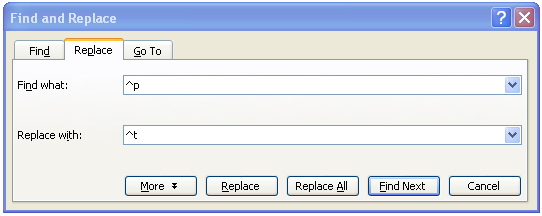
In the “Find what:” box type in ^p
In the “Replace with:” box type in ^t
Hit “Replace All”

The “^p” is Word’s code for the carriage return, and the “^t” is the code for a tab. So, all we’re doing is removing the carriage return and replacing it with a tab.

Once you’ve replaced the carriage returns with tabs, the text should now look like this:

Copy that line and go to the cell in Excel that you want to paste it… but don’t paste it yet… there’s still one more trick to do. Because I don’t like to bring in all the formatting from MS Word into my Excel spreadsheet, I use the “Paste Special” -> “Text” or “Unicode Text” feature. This will strip out all the formatting that a regular paste function would bring in. So, if you “right-click” -> “Paste Special” -> “Text”, you should get something that looks like this:

That works great if you only have one address, however, you’ll probably have an entire list of addresses that you want to move from Word to Excel. Here’s a way to to that.

Tip #2 – Moving Multiple Address from Word to Excel
I’m going to make one big assumption here, and that is that each of the addresses you have in Word is separated by two carriage returns. With that in mind, what we need to do is add a step at the beginning and end of the procedures we did with the single address so that we can move the next address to the next row in Excel.

Here are our addresses:

1111 First St. Apt. 4A Houston, TX 77002  1111 First St. Apt. 4B Houston, TX 77002  1111 First St. Apt. 4C Houston, TX 77002  

Step one is to remove the double paragraphs and replace them with a “line return.” The reason is that we still need to keep the data on separate lines, and this will allow us to do so without messing up the ability to put the tabs in the right place. Now, for most of you, the carriage return and the line return look pretty much the same on MS Word, but trust me, Word knows the difference and we can take advantage of that.

Open up the “Find and Replace” function again.
In the “Find what:” box type in ^p^p
In the “Replace with:” box type in ^l
Hit “Replace All”

Just as before, the “^p” means carriage return, but the “^l” (that’s a lower-case L) is the code for a line return.

Now we repeat our previous “Find and Replace” function to remove the remaining carriage returns and convert them to tabs.

In the “Find what:” box type in ^p
In the “Replace with:” box type in ^t
Hit “Replace All”

Now, you don’t necessarily have to do this next step, but I like to do it just to keep the data clean and consistant. I like to convert the line returns back to carriage returns before I paste it over to Excel.

In the “Find what:” box type in ^l
In the “Replace with:” box type in ^p
Hit “Replace All”

You can now copy over the information from Word and do your “right-click” -> “Paste Special” -> “Text” in Excel and end up with something that looks like this:

Just as with most “tips and tricks” there are always little things that can pop up that throws the steps off a little, but most of the time you can work your way through those little hick-ups.

Hopefully, these two little tricks will help you out in the future when you have pages and pages of data that you need to move from Word to Excel. Instead of send that document over to your Secretarial Services to have them manually type it in, use this and save everyone the time and effort.

I just saw the press release from LexisNexis announcing the addition of American Lawyer Media (aka ALM) content to the Lexis service. As a single-service shop (we only have Lexis), I have to say that I’m a bit confused. First this content was available through both Lexis and Westlaw. Then came the Westlaw “exclusive.” And now the Lexis “exclusive.” All the while, it remained available through ALM’s Law.com platform.
I used to compare the ALM access situation to my iPhone. If I wanted it bad enough, I would use the service it was on. Like AT&T, people complain about the service but didn’t have much of a choice. It was either go through Westlaw or through the google-type search engine on Law.com. Readers of my prior blog posts can guess which one I went with. I was willing to endure being inundated with results over the alternative.
ALM does have great content and I am pleased that it is available on the Lexis platform. Being able to run targeted searches on this content will be a wonderful change. However, I’m not so pleased that, after purchasing it in print and through Law.com (not to mention getting premium access to their surveys), I’ll have to pay a third time to get it from Lexis. I think the best solution would be to follow the iPhone lead and make their content available at least on both of the top two platforms.
A few weeks ago I wrote a post attempting to define KM. It was simplistic and possibly naïve, but you have to start somewhere. Since then, I’ve come to realize that beyond a conceptual understanding of KM, you shouldn’t waste too much time trying to define it. The search for a single definition that will appease all parties is a fool’s errand. So with a conceptual understanding under my belt I began to focus on KM in a legal environment. How can we use KM within a law firm?
There are a couple of books on the subject and there is a close knit group of Legal KMers that are active on Linkedin, Twitter, this blog and the blawgosphere at large. These are brilliant people, who have spent a lot of time thinking about KM in law firms and they are willing and eager to share their experience and ideas. What more could a new legal KMer possibly want, right? Well, here I go again with my naïve and simplistic approach, but it seems to me that there’s a big chunk of the conversation that’s almost completely missing – The Staff.
I don’t have the statistics at the ready (don’t hold me too closely to the numbers), but experience tells me that non-attorney staff make up approximately 50% of law firm employees, while the Legal KM literature and ongoing conversations are about 95% focused on attorney knowledge flow. I hear a lot of…
· How do we improve knowledge flow within and between practice groups?
· How do we best capture the tacit knowledge gained after the transaction has occurred?
· What technologies will best facilitate collaboration between the attorneys, and between attorneys and their clients?
I don’t mean to say that attorney knowledge flow isn’t important, just that it’s not the only knowledge flow problem we have. Most of the non-attorney staff in a law firm are also knowledge workers. If we’re taking a holistic approach to KM within a law firm, shouldn’t we also be asking…
· How can we make it easier for non-attorney staff to communicate and collaborate?
· How can we more efficiently manage incident response within IT?
· How can we transfer the tacit knowledge of a retiring 45-year veteran legal secretary to the 22-year-old replacing her?
I do not hear many of these questions bantered about in Legal KM circles. (And for those of you keeping track at home, here’s where I’m really going to step in it.) I think that’s because the people writing the books and most of the KMers within the Legal KM-iverse are currently, or were at one time, attorneys. That doesn’t make them bad people. In fact, it makes them well suited and qualified to handle the specific problems of implementing KM within a firm. Plus attorneys are much more likely to listen to another attorney talking up KM, than they are to their former IT guy. However, it also means that their perception of law firms is kind of skewed toward the attorneys. I’m not sure to what degree the non-attorney KM problems are even on the radar.
And yet, from my perspective as a non-attorney KMer with many years of support experience (and very little experience in KM), I see the problems of communication and execution amongst the support staff as the low-hanging KM fruit of law firms. Call it my “trickle-up” theory of Knowledge Management. I think we may be better served by building a culture of quality KM in the 50% of staff below the attorney level and then let the attorneys come along whenever they finally get it.
P.S. And this is a serious question. What percentage of KM leaders at the 2010 MAKE (Most Admired Knowledge Enterprise) winners are current or former practitioners of the company’s primary business? Engineers at IBM and GE, programmers at Google, Apple and Microsoft, accountants at Ernst and Young? Just curious.

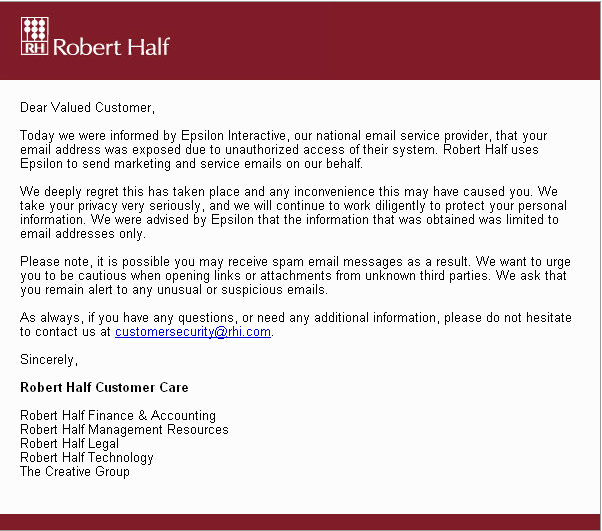
If you were like me, you probably got one of these emails this weekend from a number of companies that were exposed to a hack from their outsourced email campaign company, Epsilon Interactive.

Here’s one example I got from Robert Half Legal:

So far, I’ve received one from Robert Half, BestBuy, McKinsey & Co., and AbeBooks. However, according to Mashable, the list extends to many well know companies including, Kroger, TiVo, US Bank, JP Morgan Chase, Capital One, Citi, Ritz-Carlton Rewards, Walgreens, LL Bean, the Home Shopping Network, and many, many more.

The idea that so many well-known and respected companies were using this single-source for their email campaigns made me wonder about the risks that are involved with this type of outsourcing and how substantial the effects of a single company’s compromised information has on the multiple companies that use the services. The outsourcing of this type of service makes perfect sense when looked upon by a single company, but at what point does the risk overwhelm the benefits when an outsourcing company becomes a single point of failure for multiple companies?

This made me wonder about the outsourcing needs for law firms. On an individual law firm basis, it may make perfect sense to outsource a number of processes. However, when we stand back and look at the risks that an outsourcing company takes on for its entire customer base (multiple law firms) then the risks to the individual firm become greater. For example, if multiple law firms were to outsource their email systems to a single cloud-based system, or outsource all e-discovery to a single provider, or keep data from their client relationship management (CRM) tool on an outsourced system, the initial risk may seem very low, and the benefits very high. However, the risk may actually be much higher than you anticipate as more firms outsource their information to a single vendor.

Now, before you start thinking that I’m totally against outsourcing certain processes, there are a number of good reasons why firms outsource processes. Outsourcing, when used in the right way, can create a much more efficient process, can be overall less expensive, and can be scaled up and down according to the needs of the firm. Even the chances of someone hacking into the information can be far less likely from a well established outsourcing company’s system when compared to the chances of a law firm’s local information being hacked. So, there are substantial benefits to outsourcing that make perfect sense when looking at your firm’s individual risk/benefit analysis.

The issues that confront an outsourcing group like an Epsilon, however, bring in risk factors that perhaps firms do not contemplate initially because they tend to think of their individual risks only, and not the risks that might happen if the firm’s data is compromised and then commingled with data from a peer firm’s compromised data. Just think of the conflicts checking that would have to occur if you had to include client representation from other firms’ because their information was compromised along with your own. It would be almost impossible to clear a conflicts check in a scenario like that.

In many cases, efficiency will breed more efficiency, and in the outsourcing world, that means that fewer and fewer companies will be the “go to” companies for law firms to use. The potential for problems with putting alll those eggs in one basket could create situations similar to what happen to the major news networks during the 2000 elections when they all relied upon the Voter News Service to project exit-polling from the Florida election and projected Al Gore as President. As with that situation, there existed a single point of failure where one company influenced (embarrassed) many reputable other companies because of a single event.

The thing to remember is that when you place your eggs in a basket with other law firms through an outsourcing company, just remember that your risks have expanded beyond what is  contained within your individual egg shells. If your eggs and your competitors eggs get dropped, you are all now responsible for the resulting mess. Once those eggs are scrambled together, you won’t be able to separate your individual eggs from all the others that were in the basket. Remember to add that scenario to your next risk analysis when outsourcing your firm’s processes and information.

After years of complaining at how inefficient law firms are, we here at 3 Geeks have begun work on a business plan to open a law firm in North Carolina. Although we would rather stay here in wonderful Houston, Texas, we have it on good authority that the North Carolina legislature is set to pass the “Allow Non-attorney Ownership of PC Law Firms” bill which will allow for up to 49% ownership of a law firm by non-attorneys. Add to that, the fact that the North Carolina flag is designed very similarly to the Texas flag, we’ve decided it must be an okay place to do business.

Toby and I have been saying for years that law schools produce lawyers that are ready for the bar exam, and prepare them to “think like a lawyer,” but that their skills at running a business aren’t usually as good as their ability to cross-examine a witness. We’ve tried for some time now to dole out information, tips, hints and tricks on making the operations of running a law firm better for both the client and the lawyer, but we feel that the North Carolina option will give us a chance to really put our ideas into motion, and potentially make a hefty profit along the way. We have one of the Financial Geeks looking into the tax benefits of creating an offshore operations in Grand Cayman that may enable us to expand into the UK market as well (Geeks seem to like New Zealand for some reason.)

Although the details need to be tweaked a bit, we’re looking at a bevy of names for the firm:

  • Geek, Geek & Geek, PC
  • Geek³, PC
  • 3 Geeks and a Law Firm, PC

We’ll have to check on the actual naming rules of North Carolina, but we’re pretty sure we couldn’t go with one of the suggested firm names of “We’re better because non-attorneys are managing this firm, PC”

“It’s a win-win situation,” commented one of the Geeks in a recent conversation over margaritas. “Lawyers can focus on winning cases and bringing in new business, while we work on Alternative Fees, improving efficiencies, and coaching the attorneys on better business models that will attract more clients.”

The initial idea for the firm is that 3 Geeks would recruit a core group of attorneys in the initial stages, and grow to a size of 51 attorneys, each as equity owners of the firm, each with a 1% stake. Although the Geeks would not have to vote as a block… let’s face it, we’d be pretty stupid not to. So, although technically the Geeks would be minority owners, the idea is that we’d still run the show.

If the North Carolina project works out as well as we think, we would hire lobbyists to start pressuring other state legislatures to enact either a 49% non-attorney ownership rule, or even better, just do away with the majority ownership requirements altogether. In the end, we think that we’ve launched on this April Fool’s Day an announcement that will be the future of how law firms are managed.

[Image (CC) by xxrobot]

In last week’s Elephant Post, we asked what software you hated to use at work. So, this week we modified the question a bit and asked what software would you like to use at work, but for multiple reasons (most of which probably begin with the initials IT), cannot use.

The consistent answer was “something that makes my life easier.” Now, really, is that too much to ask for?? (Apparently, it is.)

Take a look at what the contributors had to offer, and if you didn’t have a chance to chime in with your favorite “non-authorized” software/hardware that you’d love to use at work.

Elaine Knecht
Librarian
Smart Software

As my friend the software developer says… … I want to use the software that does what I MEAN instead of what I tell it do do!
Jennifer Stephens
Librarian & Geek
Movie editing software, MacBook Pro, iPad

Movie editing software – wouldn’t it be great to make short “how to” videos for new associates/summer associates?
MacBook Pro – lots of power, battery life, simple OS. My newer MBP also has Windows 7 installed inside of Fusion (virtualization software).
iPad – wouldn’t it be great to have a lightweight tablet to carry with me, to field reference questions or show services on the fly? I could go to the attorneys’ offices to say, “look at the new…” (No, I don’t own an iPad. Just two MacBook Pros, an iPod, and an iPhone 4.)
Cyndy M
Law Firm Marketing Technologist
Roboform

The much ballyhooed “single Sign-on” concept was a unicorn, a myth.
With every application and website requiring a login, I need a handy way to automate the process. This tool manages my passwords, logins and form fields.  Thank you, Roboform.
Greg Lambert
Library/Records Guy
Something Google-Doc-ish

I’d love to have some type of collaborative software that works as well as Google Docs, but is securely behind the firewall of the firm. I’ve worked an a number of projects with external folks using Google Docs and found it to be amazing in getting everyone on the same page (literally) and usually while discussing it on a conference call, we’ve been able to get hours of work accomplished in a matter of minutes. If we had something behind the firewall, I could get those inside the organization to collaborate in an easy and SECURE way.
Megan Wiseman
Law Librarian
Meebo

I admit my academic side is showing in this opinion but I felt I had to answer this week’s question after sharing my software woes last week.
In a nutshell: I miss having chat reference.
Currently I’d estimate that about half the emails I send back and forth and maybe a third of the calls I get regarding reference requests could easily be replaced by a quick IM.  I know of companies that use “chat” software to facilitate communication when e-mail is just plain overkill, so it is possible to roll something like this out in a corporate setting…  but I’m just not sure how well it would work in my firm.  I can see drawbacks and benefits productivity-wise as well as the problem of having one more piece of technology to fold into people’s work style.  But I miss not having to say “now can you spell that?” and being able to instead just copy and paste the name/citation/address/whatnot into my Google bar right from the chat window.
Saskia Mehlhorn
F&I Librarian
Camtasia

I think it is an excellent tool to bring training sessions  to the student and faculty (and anyone else who uses our website) so they can use it when they have a need for it and not just when we are physically available.
We could use it for all types of scenarios, going from “How to use the catalog” (followed after explaining to them that we actually do have a catalog), to the usage of the different databases, on how to perform legislative research up to international case search. The possibilities are endless.
Ryan McClead
KM
Microblogging Software

“Email is where knowledge goes to die.”  – Bill French
I love this quote.  It makes me laugh and it’s true.  Taken together with another truism, Lawyers live in Outlook, you can begin to see the problem.  All of that work, all of the knowledge disappears along with the regular IT data purge.  I dream of persistent, searchable, conversations which can be copied, pasted, linked to and generally re-purposed indefinitely.  I dream of group project discussions continuing throughout the week, rather than only happening once a week for an hour.  I dream of real-time spontaneous collaborations.  I dream of a flattened organization where the newest, most junior member of the company can easily converse with the CEO/COO/CIO and everyone else can share in their joint discoveries.  It’s a lot to put on microblogging, but I think that’s a good place to start.

Next Week’s Elephant Post:

Tell us your favorite PowerPoint presentation story (good or bad… but, preferably bad!)

Toby’s post on not using PowerPoint in a recent presentation garnered a lot of comments and traffic this week. Therefore, we thought we’d give everyone an opportunity to talk about some of the presentations that they’ve seen or given and what you’ve learned from that experience. Did you give too much information on the slide? Did an old version of your presentation get saved to your thumb drive? Or better yet, a completely different presentation? Go ahead and give us the dirt on what went wrong… or if you nailed a presentation because of PowerPoint, let us know that as well.

Google just announced its answer to Facebook’s “Like” button: the “+1” button.
What will happen is that the “+1” will display on your search results as long as you are logged in to your Google account and have opted to participate in the Google +1 Experiment.
I’m not so “like”-ing it. While investigating, I found out that I had to publicize my private Google account. And that all private Google accounts would be deleted by 7/31/2011. 🙁
As a suspicious, neurotic female, I am loathe to publicize my location information. Call me crazy, but even frumpy old me has had my share of quasi-stalking incidents: old boyfriends looming from the past, penal residents. You get my drift.
(As a side note, as a new female lawyer, I got my share of handwritten appeals mailed to my home address from Texas prisoners begging me to represent them. I quickly learned to unlist myself. As a newbie attorney, tho, it was quite a shocker.)
But I needed to check out this whole +1 craze for my job. I’m diligent that way. So I go check out my profile to make sure everything is copasetic. That’s when I realize that Google is going to make me go public.
Google states, “If you currently have a private profile but you do not wish to make your profile public, you can delete your profile. Or, you can simply do nothing. All private profiles will be deleted after July 31, 2011.”
WHAT?!?
I gotta come out of my nice, cozy, private world in order to play with +1? Heck, even Facebook let’s me lock down my account.
So you know what I did, right? Fake data. I’m ageless, virtual and able to not just bilocate but multilocate.
Some tips to stay quasi-private:
  1. Don’t use your real name
  2. Use a generic phrase to describe your business rather than giving a business names or school names
  3. Limit who can see your e-mail, home and business addresses. I set mine to contacts and family.
  4. Don’t display the year of your birthday. You can limit display to only family and contacts.
  5. Don’t specify your gender.
  6. Lastly, and perhaps most importantly, do not display your customized URL. It shows your e-mail address.
OMG. I like Google, in a generic, gotta-have-it kind of way. And I know their mission is “do good”. But just kinda have this itch in the back of my cranium that says in 100 years, Google is gonna be Hal.
You know, Hal for 2001 a Space Odyssey?
Ugh.