Since my presentation with Kingsley Martin at TECHSHOW 2010, I have been giving more and more thought to the evolution and future of KM. Previously we have posted on 3 Geeks about the impact of AFAs on KM, but I think there is a bigger under-current that will drive the next generation of KM. That under-current comes in the shape of massive amounts of data.
In May of this year, predictions were the world will soon pass the zettabyte threshold for the amount of data in existence (think 1 billion terrabytes). As the e-discovery world has already learned – humans are unable to deal with large quantities of data in a meaningful way. The obvious answer to this question has been technology. But so far that technology has focused on search and collaboration (Web 2.0 included). Most KM systems are focused on better-faster-cheaper search and retrieval systems. This approach will suffice to a point. Crossing the zettabyte threshold may be the metaphorical line-in-the-sand where search falls apart.
What is needed now is technology that analyzes our data/information/knowledge for us. Our reservoir of knowledge has become like the oceans. We can’t understand the vastness and nature of them while standing on the shore. The resulting inability to ask the right questions limits the advance of our knowledge.
So now we need our technology to take on this new role. I recall a conversation with a data miner a few years back that illustrates this point. He was analyzing (in 3 dimensions – whatever that is) 911 call data. He was able to determine where and when police should be deployed based on this analysis. 911 call centers were not originally designed with this question in mind. The data revealed the question as a result of the analysis.
KM 3.0, as a set of analysis systems, will be the kind of tool best situated to address this challenge of oceanic volumes of knowledge. I have seen a few emerging tools heading in this direction (e.g. Lexis for MS Office), but will be keeping my eye on the horizon for more examples to appear.

Thanks to Ed Walters at Fastcase for letting us actually install their new iPad application while it is awaiting final authority from Steve Jobs to be released through the Apps Store. I’ve been playing with it for the past hour or so and have taken a lot of screenshots from the iPad, and so far, it has been pretty easy to use and takes advantage of the iPad’s larger screen format. Most of all, this is another marketing coup for Fastcase (just do a Google search for Fastcase and iPad and see the number of blogs, press releases and news articles from yesterday and today announcing the launch!!)

When Fastcase released the iPhone app, I gave it a luke-warm reception because the iPhone app seemed to be more of a novelty than something that someone would actually use. The iPad app, however, is something that people would use to conduct legal research, as it has a bigger screen, and is much easier to use than the smaller iPhone format. You still can’t print (not a Fastcase app issue, but rather an iPad issue), but you can save documents, and if you know what you’re doing, you can email documents to yourself and print them out at your PC or Mac.

Here are some ‘real’ screenshots that I took (not those canned ones you’ve been seeing on all the other blogs!!) along with some comments I have on the usability of the app.

Splash Screen:
This appears for a few seconds while the app launches.

Start Screen (Select what you want to search)
Select the database you want to search (you cannot search both cases and statutes at the same time). You can also browse statutes (any statutes that are not in the Fastcase databank, such as Colorado, will give you an option to launch the iPad browser to go to the official state statute site.)

“Search Caselaw” Screen
Seems to be basic Boolean searching or you can look up by citation.

The Conducting Search Screen (AKA “Hey, why don’t you upgrade to our full version” Screen)
If ‘free’ is nice, the premium version must be better, right??
The searches I conducted took anywhere from three seconds to about fifteen seconds… depending upon the databases selected and the search terms used.

Caselaw Search Result Screen
You can set the display options in the “settings” area. This shows the top results by relevance and gives you the name of the case, decision date, and the number of times this case has been cited.

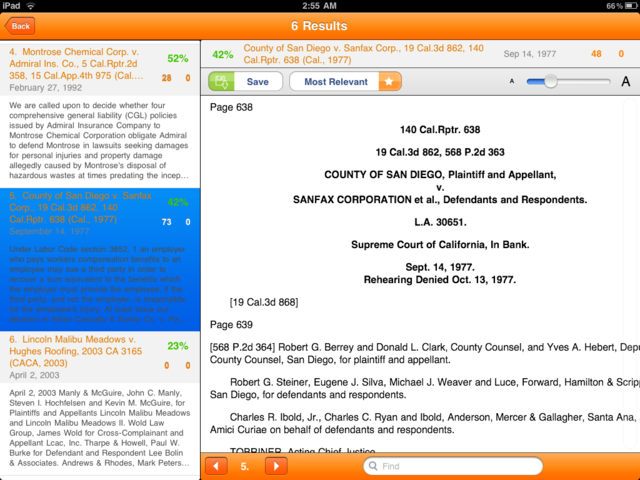
Caselaw Reading Pane View
The reading pane is nice and clean. You can also ‘swipe’ to the next result by swiping left, and the previous page by swiping right. This was actually backward from how most other iPad apps work, but I adjusted quickly to the way it works here.

Authority Check Report Page
Although it is not quite a KeyCite or Shepards’ results page, it is helpful to have the ability to see cases that have cited this case. It would be even better if Fastcase did this for statutes and other primary law material as well.

Statute Search Results Page
Here’s the results page for a statute search with the short name and citation to the statute listed.

Statute Reading Pane
Reading pane for statutes is similar to the caselaw reading screen.

Increase Font Size Option
There is a slider bar that allows you to increase the size of the font. In the next version, it would be nice to allow you to adjust the font through the ‘pinching’ or ‘expanding’ the screen by using two fingers.

Save Document Option
You can save documents to read later.


Saved Document Screen
The saved document screen will display all of the documents you’ve saved. A nice addition to this would be to allow the user to add folders so that documents could be saved to specific research projects.


Recent Searches Page
Past few (default is 10, but you can increase in the settings page) searches are displayed and can be re-run from here.


Settings Page
Adjust the look and feel of the results, display and storage of the app.


The Upgrade to Full Fastcase Version Page
Again… if free is good, premium is better!!


Option for Getting Around the iPad’s Printing Issue
Step 1: Press and hold your finger at the top of the screen (somewhere with “white space”) until the blue “copy” highlight covers the entire text.

Step 2: Press Copy
Step 3: Open your email program and paste the document into the body of the email. You could also push the text to something like Evernote if you use that.

Step 4: Print the email from your PC or Mac when you get back to your office.

Until Steve Jobs seems to think it is okay for you to print directly from your iPad, this type of work around will have to do.

I’ve had no problems navigating or searching around the iPad version of Fastcase. It is pretty straight forward and easy to use. It doesn’t take advantage of all of the bells and whistles that the iPad offers, but I’m sure that over time it will. I’m looking forward to showing this around to my peers at the AALL conference this weekend (since I know that most won’t even have an iPad… and none will have the Fastcase iPad App!!)


Fastcase is releasing an iPad version of their free legal research app (currently available on the iPhone), and announced the launch on Jeff Richardson’s blog iPhone J.D.  Currently you can download the iPhone app to the iPad and run it in the 2x mode, but it is still an iPhone app and looks strange on the iPad’s large screen format.

I’ve gone to the Apps store to find this updated version, but it doesn’t appear to be released as I’m writing this. So, go over to iPhone J.D. and check out the information that Fastcase’s Ed Walters gave to Jeff. (Or, Legal Geekery’s review… really Ed?? Where’s the love for 3 Geeks??)

A couple of weeks ago, I talked with some of the folks at Wolters Kluwer, who are also releasing a new version of their IntelliConnect interface (Web-based… not iPad based… yet!) and one of the comments that caught my attention was that they are also releasing an iPhone enhanced browser-version (as well as Blackberry) for IntelliConnect, but are waiting on creating the iPad app version because they don’t see it as a “larger iPhone version”, but rather as a unique platform that calls for a unique approach on producing applications. The “tablet” computers that are coming out are really changing the way information providers (legal or otherwise) are presenting their information. Even the WestlawNext developers are excited about the tablet interface revolution that is happening. Although it appears that the new Fastcase App isn’t set to take advantage of all of the advantages you get from the iPad (larger screen, touch functionality, etc), Fastcase is doing a great job of being “first to market” for their product.

Maybe Ed Walters will let us give the new platform the “once-over” before releasing it to the public!! (hint, hint!!)

Google Scholar is adding a new feature that allows researchers to conduct a search within the documents that cite to a specific case. This takes its “cited by” function up a notch by allowing you to limit the search to cases or secondary resources that have all cited the same document. I got a note from Google Scholar’s Chief Engineer, Anarag Acharya this morning that laid out some of the details.

Just a quick note to mention that earlier today we added the ability to search within citing articles to Google Scholar. This has been a popular feature request 🙂 It allows you to search the complete text of the set of articles/cases citing a document, It can also be used to limit the results to citations from specific jurisdictions (via the dropdown on search pages or the advanced search page).
A blog post describing this with examples and an illustration is at the Google Scholar Blog

It’s a pretty simple addition, but one that may assist researchers in narrowing the amount of information they need to search in order to find what they are looking for.  Here’s a snapshot of the new feature:

It seems that the handful of folks at Google Scholar are still listening to their users. So, if you have any further suggestions, you should contact them through their suggestions page.

Over the past few days there’s been a number of good posts on the programming at AALL and comments on what some members would like to try differently in the future. I know that there are many AALL members that probably feel that the AALL Executive Board and the conference programming committees have been “picked on” by the criticism and suggestions (and maybe they have), but to look at Catherine Lemann’s response, you see that she and the other members have been paying attention, and compiled an excellent FAQ webpage that lays out, in great detail, the processes they took as well as other answers to questions that have been floating around the blogosphere this week.

This type of proactive, honest and detailed response is exactly what AALL leaders needed to do. Notice that this wasn’t put out to stop the discussion, but rather to put facts out in order to keep the discussion going. Some of the vendors that snap back at critics with answers like “there’s a lot of misinformation floating around” as a way of deflecting issues, could learn a thing or two from the actions taken by Catherine Lemann and others at AALL.

Go check out the FAQ… it has a lot of great details on the process along with some other information that members have been asking about.

Here’s  Catherine’s note to the members of the Private Law Libraries listserv:

There have been a lot of great online discussions taking place among AALL members about how to make the Annual Meeting even better, especially its educational content. This discussion is wonderful to read, because it underscores how active and invested our members are in the law library profession and in AALL.

It is important we challenge each other to make things even better, so we can continue to develop our skills and gain knowledge from each other. I, and the rest of the Executive Board, have been listening and reading and thought more information about how the current process works would be beneficial to the discussion. So we have worked to put together an FAQ to answer some of the questions that have come up in these conversations. I hope you will find this information helpful. We welcome the discussion and your input. Thank you for your commitment to AALL and your colleagues in the profession.

Catherine Lemann
AALL President

I also like the section of the FAQ that asks:

What are the top three things I can do to ensure that programs meet my needs?

  1. Propose a program.
  2. Work closely with your SIS’s Education Committee.
  3. Always respond to AALL surveys which solicit member opinions and ideas.

AALL is successful because of the involvement, enthusiasm, and creativity of you, its members. AALL strongly encourages you to volunteer to help support the professional needs of your law librarian colleagues.

One of my friends (who also happens to be a Westlaw Rep) mentioned that she had some clients that were confused when I discussed “Cost Recovery” in the past:

They are on flat rates, and are small 3 or 4 atty firms….so they were relieved to learn that oddly enough, usage has nothing to do with their pricing and they can use the fire out of it without raising their bill. I was relieved to see that you explained that in the update – thank you!. In my world, 100% of my customers have flat fee subscriptions, and they read your column too. It provided me a wonderful opportunity to explain how their plan works, but the situation was eye opening to me. 

First of all, I’m thrilled that her clients are reading my blog (or is she just saying that to kiss-up??… oh well, either way is great!) Second, I should warn anyone that reads this blog that we have a terrible slant toward how things are done in BigLaw. Toby’s not as bad at is as I am… but, it’s kind of what we know.

I thought that I’d put together a short little presentation that describes the basics of cost recovery (at least in some big firms.) I created this in PowerPoint, then converted it to video using PowerShow.com. The conversion caused a few timing issues, but for a freebie… I’m not complaining! (okay… I’m now complaining. Unfortunately, PowerShow’s presentation is an “auto start” “auto repeat” process that is apparently impossible to turn off, so I’ve embedded the presentation from authorSTREAM instead.)  If for some reason you can’t see this because your IT department seems to think that “embedded video” = “porn” … then you can download the presentation by clicking here. Again, it is a very, very basic overview of how firms recover the cost of Westlaw or LexisNexis searches, but sometimes basic is what we need.


[Guest Blogger – Tracy Thompson-Przylucki]

I’ve given a lot of thought to the issue of Annual Meeting programming almost since my first meeting in 1997. I can recall in my first few years of attendance hearing my more senior colleagues express dissatisfaction with the programming, the scheduling, the no-conflict limitations, etc. As I newb, I was still absorbing so much I couldn’t imagine what they were lacking. But now (and for a few years) I find myself in the same boat. I want to be part of the solution but so far the exact formula for Annual Meeting nirvana eludes me. I still really enjoy the Annual Meeting and wouldn’t miss it for the world, but I’d be thrilled to see some disruptive change, some risk-taking. Even if it failed.

I don’t have any transformative suggestions, but I do have some observations. First, less is more. I’d like the Annual Meeting to be less of a mad dash and more of an opportunity to really connect with our colleagues, vendors, etc. A time to reflect, consider and absorb. Recently, especially since it’s been shortened, the AM feels frenetic and fractured.

Second, AALL (or any organization) just can’t be all things to all people. They have to maximize their resources to approach a Benthamesque balance; the greatest good for the greatest number. There will always be some of us who need/want more.

Third, taking these two points into account, I’d like to see LESS programming (throw eggs and hiss here), limited no-conflict times, and that lost day returned to the schedule (with no programming or exhibit hall on the last day). AALL could facilitate meetings (members sign up for the space they need) on the final day (SISs, committees, working groups, ad hoc groups, chapters, etc.) so that members would have the opportunity to get some of the real work done without conflicts.

I know that the number of programs will always be an issue. I just don’t think we need 6 or 8 programs in one time slot. Maybe 4? And rethink the tracks?

Perhaps (thinking out loud)

  1. New Professionals (<5 years) 
  2. Mid-career Professionals (5-10 years) 
  3. Advanced Professionals (10-20 years) 
  4. Mentors (>20 years). 

Or

  1. Law Library Administration and Management 
  2. Law Library Services 
  3. Technology in Law Libraries 
  4. The Future of Law Libraries and the Profession. 

Are you thinking about all the reasons these won’t work? How about thinking about how they (or others) could work?

I like the approach of crowdsourcing as some part of the selection process (perhaps not definitive) that someone suggested. This puts some of the responsibility on us as a collective. Remain unengaged at your own peril!

When I’ve inquired about the shortened schedule I’ve been told that it was largely a response to PLL members’ needs for less time away from their offices. If that is truly the case (could be urban legend!) front load the meeting with PLL content as much as possible to give those folks the flex they need.

Of course, AALL is a business concern. If they take big risks and fail, they risk losing us, their members and their lifeblood. So all of these comments are offered with one eye on that reality and an all too familiar understanding of the challenges membership organizations face in meeting members’ expectations, especially in this economy.

The first big mistake made on reducing legal fees was the focus by clients on rates and hourly discounts. We have previously talked about the value of this approach. Lower rates do not directly correlate to lower fees. Admittedly hourly rates have some impact, however, lowering unit costs without talking about number of units will have a marginal impact on costs at best.
The Next Big Mistake
Now we’re hearing a lot of talk about the level of associate salaries (especially first years’) and partner compensation from clients and client communities. Although it is not said quite this directly, clients are wanting to see published associate salaries and PPEP (profits per equity partner) numbers go down. Clients seem to be saying “When your comp goes down, that means I’ll truly be saving money.”
Thinking lower first year salaries or lower PPEP numbers will mean lower fees is yet another mistake. On the surface it may sound like there is a direct connection between lower fees and lawyer compensation, however this is not the case. To illustrate this point, consider that giving business to less profitable vendors of any type does equate to savings. In fact it has an equal or better chance of resulting in the opposite.
Taking a higher level view of this trend, I can see its source. In-house counsel have had issues with billing rates and outside counsel comp for years. So when internal pressures rose to decrease legal fees, the first two things in-house counsel would address are rates and comp.
My advice to clients: If you want to impact legal fees, focus your conversations on fees. I can appreciate the frustrations with rates and comp, but you should move past those and shift your attention to the real issue – Fees. I also appreciate that fees and cost savings are a new and challenging aspect of your job. Facing these issues head-on will be the least painful and most effect approach, in the short and long run.

[Guest Blogger Mark Gediman]


Since my post last week (A modest proposal), I’ve discovered that I’ve hit a nerve.  I’ve received several off-the-record responses as well as a few blogged ones, the most recent of which was from Caren Biberman this morning.  I have to say that several things have become apparent to me:

  1. I’m not as “connected” as I thought I was.
    I was unaware of the reports and decisions referenced by Caren in today’s post.
  2. There are quite a few PLLers who feel disenfranchised by the current programming at the Annual Meeting
  3. I have trouble seeing how a registration rate of less than 7% of the PLL membership in the pre-meeting Summit can be pointed to as a positive.
  4. Out the 100 people register for the summit, how many are attending the meeting? This to me would be a telling statistic.
  5. Over 1000 viewings of the post, but only 6 comments.  Hmm…

So, to address each of these:

  1. Why isn’t there better communication between AALL and the membership? Every posssible avenue should be used:
    AALL email list.  
    If it works for the President’s Letter, it can work for these kind of hot topics.
    SIS and Chapter listservs
    My experience with blogging has shown me that only when you let the widest possible audience know do you truly have a meaningful dialog.
    SIS & Chapter Leadership
    These are the people who are more closely connected to the membership, whether geographically or through their library.  Shouldn’t they be utilized more effectively?
  2. This is truly disheartening and should be a major concern for AALL.  The membership of the single largest segment of the association should be made to feel a part of the group.  The consequences of not being inclusive would result in a splintering of AALL, an eventuality no one would like to see.  I have made lasting friendships at the Annual Meeting with people from across the country and across disciplines.  
  3. I’m happy that over 100 people have registered for the Summit, but that means that about 1400 people didn’t.  The question we should be asking ourselves is “What can we do to bring more people to the Annual meeting?”
  4. Relating to 3, how many of the 100+ are sticking around?
  5. This appears to be the “Third Rail” of AALL politics.  Everyone wants to change but very few are willing to speak up.

My suggestion is just one possible solution.  Tracks are not by their nature exclusive.  People will remain free to choose to attend programs that match their interests, regardless of SIS affiliation.  The purpose of tracks is to ensure that needs of each group are being met.

Perhaps the AALL Business meeting in Denver is the proper venue to bring this discussion into the open.  I think that any discussion that has the success of the Annual Meeting and, above all, the Association as its goal is inherently good for the organization.

Marketing is not a bunch of random acts of marketing.

After reading Kim Rice’s blog on “How Can Law Firms Help Their Lawyers With Marketing?”, I just had to chime in.

The science of marketing, which is a combination of accounting, economics, statistics, management and, now, online technology, is a complex and fascinating field to which professionals have dedicated years of study. It is the science of trends—of both people and businesses.

May times I have seen law firms treat marketing as the party-planning crowd: drafting and re-drafting invitations like they are legal documents, creating fancy brochures (online or otherwise) and dreaming up one-off seminars.

But on some occasions, I have witnessed a few firms that have created an admirable alliance between marketing professionals and law firm leadership. Together, they create a firm vision, establishing a marketing plan to achieve that vision and then executing a strategy for its achievement.

This is terribly hard to do. It requires law firm leadership that respects the science of marketing and values the benefits that good marketing can reap. It requires a legal marketing professional that knows how to explain the importance of a marketing plan, then build a team that will execute that plan on a daily basis. Sometimes it requires the strength to say “no” to attorney requests that don’t fit into the firm’s vision. And sometimes it requires a leader to stand up for these decisions.

Marketing isn’t random at all. It’s a war.